Repository navigation
Java and Bedrock Selectors

You configure the proxy to show a Java inventory, a native Bedrock form, or a clickable chat list. You enforce the same lobby availability rules across all three menus.
| Player | Interface |
|---|---|
| Java with a detected backend bridge | Java inventory when routing.java_menu.type = "inventory"
|
| Java without a bridge | Clickable chat when fallback_to_chat = true
|
| Bedrock detected through Floodgate | Native Bedrock form when bedrock.use_gui_for_lobby = true and the Bedrock menu is enabled |
| Bedrock with the native form disabled | Falls through to the configured Java selector; use the chat selector if you do not want an inventory through Geyser |
The Bedrock lobby form is proxy-side and does not require the backend bridge. NPCs and backend YAML menus still require the JAR on the backend where they exist.
This client-specific behavior also applies to authentication. Java players use /register and /login. Floodgate Bedrock players receive a native registration or login form when auth.bedrock_form_enabled = true; the commands remain available as a fallback. The form fields are visible while typing because Bedrock CustomForm has no masked password input. See Authentication and Security.
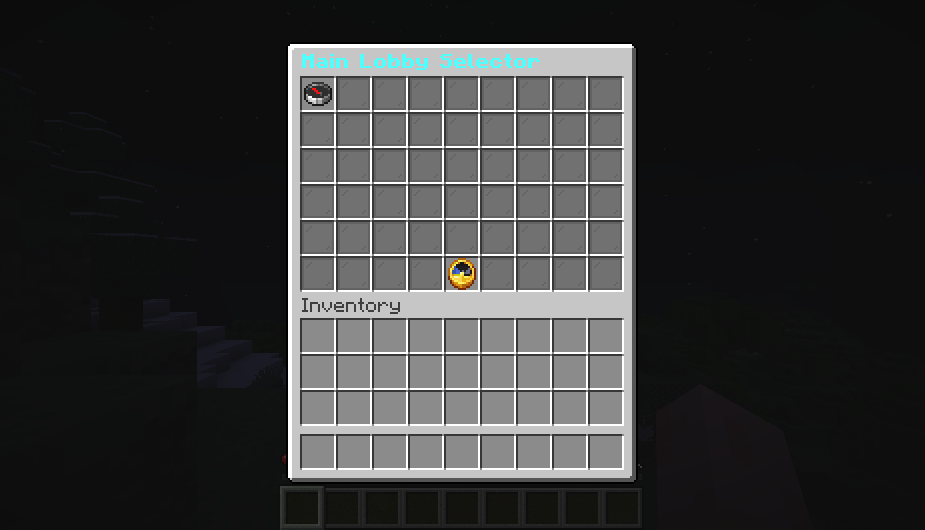
You view a real Java Edition capture from the Paper backend bridge.
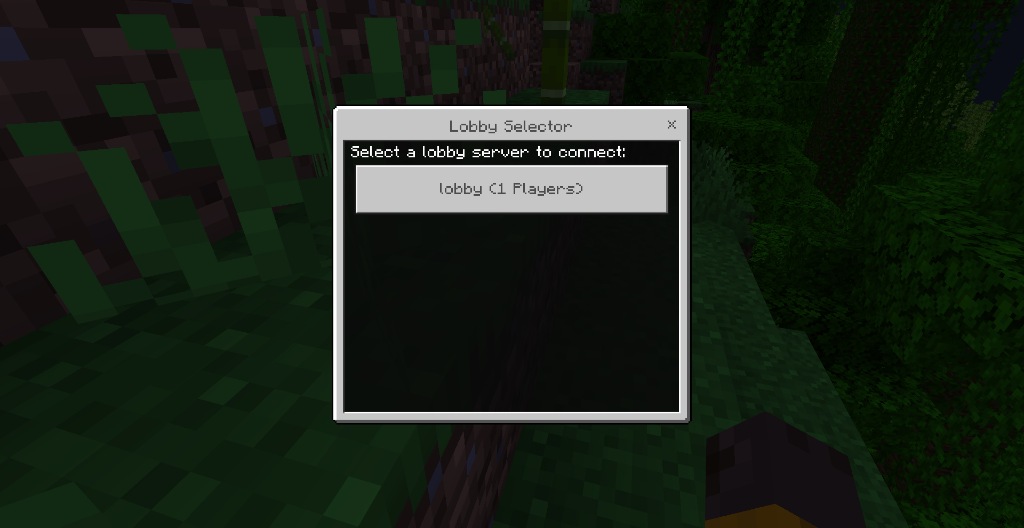
You view a real Bedrock capture through Geyser and Floodgate.
In navigator.toml:
[routing]
use_menu_for_lobby = true

[routing.java_menu]
type = "inventory"
fallback_to_chat = true
You configure inventory to use the backend bridge. You configure chat to use clickable text. Players type /lobby menu to open the selector.
- Put the same VelocityNavigator JAR on the Velocity proxy and every Paper/Spigot/Folia backend that should open the Java inventory.
- Start both servers.
- Join the backend through Velocity once.
- Run
/vn bridge statuson the proxy. - Run
/lobby menuwhile connected to that backend.
You deliver the chat selector to the player when the bridge is missing and you set fallback_to_chat = true.
You configure the inventory in gui.toml:
[layout]
rows = 6
default_material = "COMPASS"
unavailable_material = "BARRIER"
fill_empty_slots = true
filler_material = "GRAY_STAINED_GLASS_PANE"
refresh_seconds = 5

[controls]
previous_slot = 45
refresh_slot = 49
next_slot = 53
previous_material = "ARROW"
refresh_material = "CLOCK"
next_material = "ARROW"
You configure rows from 2 to 6. You have available sizes of 18, 27, 36, 45, or 54 slots. You reserve the bottom row for previous, refresh, and next controls. You place server entries in the other rows. You configure rows = 4 to create a 36-slot menu with 27 server slots per page.
rows |
Total slots | Automatic servers per page | Previous | Refresh | Next |
|---|---|---|---|---|---|
| 2 | 18 | 9 | 9 | 13 | 17 |
| 3 | 27 | 18 | 18 | 22 | 26 |
| 4 | 36 | 27 | 27 | 31 | 35 |
| 5 | 45 | 36 | 36 | 40 | 44 |
| 6 | 54 | 45 | 45 | 49 | 53 |
You match control slots from this table when changing rows. You save gui.toml, execute /vn reload, and confirm the result with /vn menu validate. You move controls outside the reserved bottom row to safe defaults during validation.
You configure control and fixed server slots with zero-based numbers. You keep slots below rows × 9. You shift invalid or non-bottom-row control slots to safe positions and fall back to automatic placement for invalid server slots.
You configure per-server overrides to set selector metadata and Java-inventory presentation. You match the table key to the server ID in velocity.toml. You include spaces in display_name and use description in selector templates. You apply menu_order and show_in_menu to Java inventory, Java chat, and Bedrock.
config_version = 2
[servers]
"lobby1" = { display_name = "Main Lobby 1", description = "Events, portals, and network help", menu_order = 10, show_in_menu = true, slot = 10, material = "NETHER_STAR", unavailable_material = "", name = "<gradient:#55FFFF:#FFFFFF><bold>{server}</bold></gradient>", lore = ["<gray>{description}</gray>", "<gray>Players</gray> <white>{players}/{max_players}</white>", "<dark_gray>Target: {server_id}</dark_gray>", "7FF88Click to connect"] }
"holding" = { display_name = "Holding Server", description = "", menu_order = -1, show_in_menu = false, slot = -1, material = "", unavailable_material = "", name = "", lore = [] }You use these fields for presentation. You retain the raw lobby1 ID for the inventory target, token allowlist, chat callback, Bedrock response, and connection request. You fall back to the raw ID when omitting display_name. You save gui.toml and execute /vn reload to apply changes.
You use nonnegative menu_order values to order the selector. You set -1 to leave the value unset. You resolve ties with candidate order for Java and chat, and with sort_mode for Bedrock. You control the physical cell with a fixed Java slot. You hide an entry without affecting routing by setting show_in_menu = false.
You use the name field for the inventory item-name template. You leave name = "" to use the localized [menus.inventory].item_name template.
You assign non-unique display aliases. You should avoid duplicates to help players distinguish buttons. You run /vn menu validate to report ambiguous labels, unknown IDs, slot mistakes, malformed material identifiers, and unsupported placeholders.
You configure Java inventory items to change when a backend is full, draining, offline, or reports the IN_GAME lifecycle marker:
[states.full]
material = "RED_CONCRETE"
name = "<red><bold>{server}</bold> · {status}</red>"
lore = ["<gray>{description}</gray>", "<red>Try another lobby</red>"]

[states.draining]
material = "YELLOW_CONCRETE"
name = "<yellow><bold>{server}</bold> · {status}</yellow>"
lore = ["<gray>{description}</gray>", "<yellow>Closed for maintenance</yellow>"]

[states.offline]
material = "BARRIER"
name = "<gray><bold>{server}</bold> · {status}</gray>"
lore = ["<gray>{description}</gray>", "<red>Currently offline</red>"]

[states.in_game]
material = "ENDER_EYE"
name = "<gold><bold>{server}</bold> · {status}</gold>"
lore = ["<gray>{description}</gray>", "<gold>Game in progress</gold>"]
You customize names, lore, and materials. You use a per-server name or lore over the state template and the global default. You fall back through per-server unavailable_material, state material, and global material for unavailable entries. You keep normal materials for healthy entries. You style IN_GAME entries according to the reported marker.
You prioritize states in this order: offline circuit, draining, maintenance-flagged, IN_GAME, full, then healthy.
You use state materials for Java-inventory presentation. You show the effective state through {status} and use {description} in templates for Chat and Bedrock.
You view Selector Customization for examples and troubleshooting.
You install Geyser and Floodgate on the network for native Bedrock forms. You configure navigator.toml:
[bedrock]
enabled = true
auto_detect = true
strip_advanced_formatting = true
affinity_use_java_uuid = true
use_gui_for_lobby = true
You adjust the form in gui.toml:
[bedrock]
enabled = true
fallback_to_chat = true
sort_mode = "routing"
max_buttons = 100
show_players = true
show_max_players = true
show_ping = true
show_status = true
title = ""
content = ""
button_format = ""
You use the active language pack for blank text values. You configure sort_mode to routing, name, or players. You sort by display_name for names. You prioritize menu_order and resolve ties with sort_mode.
You skip Java inventory rows for Bedrock forms. You configure max_buttons to limit server buttons. You let the Bedrock client choose the physical size.
Authentication uses the UUID presented by the connected player. A pending Floodgate player receives a Bedrock login or registration form on the holding backend when it is enabled in auth.toml. Lobby selection and authentication are separate forms with separate settings.
You configure text in messages.toml. You configure Java inventory titles and controls under [menus.inventory]:
[menus.inventory]
title = "<gradient:#55FFFF:#FFFFFF><bold>Choose a Lobby</bold></gradient>"
item_name = "7FFFF&l{server}"
previous = "<yellow>Previous Page</yellow>"
next = "<yellow>Next Page</yellow>"
refresh = "<aqua>Refresh</aqua>"
item_lore = ["&7Players: &f{players}/{max_players}", "&eClick to connect"]You format text with MiniMessage tags, named colors, gradients, & codes, § codes, &#RRGGBB, and Bungee-style hex codes. You apply the same formatting for name and lore values in gui.toml.
You substitute {server} and {display_name} with the player-facing alias. You use {server_id} for the registered Velocity ID. You use {description} for the description. You access variables like {players}, {max_players}, {status}, {status_color}, and {ping}.
You strip unsupported formatting from Bedrock forms with strip_advanced_formatting = true. You view Language Packs for translations.
-
Inventory falls back to chat: You join the backend and check
/vn bridge status. - Bedrock player sees chat: You verify Geyser/Floodgate detection.
- An icon is invalid: You supply a valid material for the backend version.
-
Too many servers: You rely on automatic pages for Java and configure
max_buttonsfor Bedrock. - A hidden server receives routes: You remove the server from its pool or put it in maintenance mode.
-
A state style does not appear: You clear overrides, compare signals in
/vn servers, verify lifecycle markers, and execute/vn menu validate.

Getting Started
Routing
- Routing Algorithms
- Algorithm Visualizations
- Initial Join Balancing
- Contextual Routing Guide
- Player Affinity
- Health & Circuit Breakers
- Retries & Fallbacks
- Geo Routing
Player Experience
- Java & Bedrock Selectors
- Selector Customization
- Backend NPCs
- Backend YAML Menus
- Language Packs
- Party System
- Capacity Queue
Configuration
- Configuration Guide
- Modular Configuration
- MOTD Configuration
- Authentication & Security
- Backend Bridge Configuration
- Migration Guide v3 → v4
- Migration Guide v4.4 → 4.5
Network & Operations
- Advanced Proxy Systems
- Redis & Multi-Proxy
- Common Core Architecture
- NavigatorAPI
- Storage & Databases
- Server Management
- Backend Lifecycle States
- Maintenance Mode
- HTML Dashboard
- Operations Runbook
- Prometheus & Grafana Setup
- Troubleshooting Guide
- FAQ
VelocityNavigator 4.5.0