Flappy Coo is a Flappy Bird game for the Picocomputer 6502, with a highland cow, a "coo", in place of the bird. The game is small, and each part of a full game is in it: screens, a saved best score, animated sprites, scrolling tiles, a bitmap, text, sound and three kinds of input. Study it before creating a game of your own. It builds with either 6502 compiler, cc65 or llvm-mos.
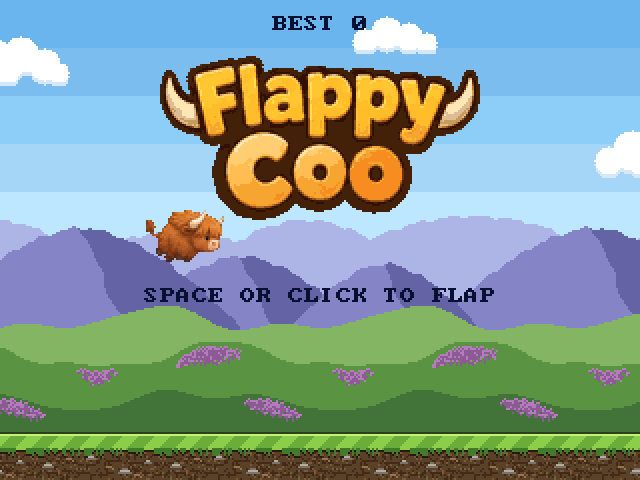
Flap through the gaps between the pipes. Each pipe passed scores a point.
| Action | Keyboard | Mouse, pen or touchscreen | Gamepad |
|---|---|---|---|
| Flap, start | Space or Enter | click or tap | A, B, X or Y |
| Pause | P | right click | Start |
To learn the tools that Flappy Coo is built with, read the SDK documentation.
| Part | Files | How |
|---|---|---|
| Frame loop | src/main.c |
Each frame: wait for VSYNC, draw, read the input, run the rules, start sounds, save a new best score. Drawing is first, in the blanking time after VSYNC, so that no sprite moves while the canvas is drawn. |
| Rules and states | src/game.c, src/game.h |
game.state is title, play, fall or game over, and game.paused is pause. The files include no Picocomputer headers, so the unit tests build on any computer. |
| Score and best score | src/main.c |
The best score is 2 bytes in SAVE:flappycoo.hiscore, read at start and written on each new best. See Saves. |
| Text layer | src/video.c |
The words for each screen, in the built-in font, redrawn only when the screen or the score changes. |
| Sprite animation | img/coo.png, src/video.c |
18 frames of 52x36 pixels at 8 bits per pixel, with a separate 256-color palette for the coo. Each frame, the image address in the coo sprite is set to the frame in game.coo_frame. |
| Pipes | img/pipe_body.png, img/pipe_cap.png |
12 sprites, 4 per pipe. The 64-row body image is drawn at double height to cover the longest pipe. Every row of the body is the same, so the doubling does not show. |
| Tile backgrounds | img/sky.png, img/ground.png |
Tile maps that wrap. The sky scrolls at a quarter of the ground speed. |
| Bitmap logo | img/logo.png |
On the title screen. Otherwise it is moved off the canvas. |
| Sound | src/sound.c |
One PSG channel each for the flap, the score, a hit and the "moo" at game over. |
| Input | src/input.c |
The keyboard, the tablet and up to four gamepads are read into two buttons: flap and pause. A mouse, a pen and each finger on a touchscreen are all contacts of the tablet device. |
| Help | src/help.txt |
Shown by HELP and INFO on a Picocomputer and in the ROM Help window of the emulator. |
| Web player | CMakeLists.txt, README.md |
rp6502_web() in CMakeLists.txt packages the ROM with the page settings in its CONFIG, and "RP6502-WEB" in VS Code plays it in a browser. The comment above the play link names the zip, and .github/workflows/web.yml publishes it to GitHub Pages, with a screenshot of the title screen that the play link shows. See RP6502-WEB. |
The device docs are Keyboard, Tablet, Gamepads and PSG.
The canvas is 320x240. Plane 0 is the back and plane 2 is the front, and in each plane the sprite layer is drawn over the fill layer.
| Plane | Fill layer | Sprite layer |
|---|---|---|
| 0 | Sky, mode 2 tiles at 4 bpp, scanlines 0-215 | |
| 1 | Logo, mode 3 bitmap at 4 bpp | Pipes, mode 5 sprites at 4 bpp, scanlines 0-215 |
| 2 | Text, mode 1 at 1 bpp, scanlines 0-215; ground, mode 2 tiles at 4 bpp, scanlines 216-239 | Coo, one mode 5 sprite at 8 bpp |
Each image must be in XRAM in the exact format of the VGA mode that draws
it. The modes that Flappy Coo uses take packed pixels for sprites and
bitmaps, 8x8 tiles with a map of tile numbers, and palettes of RGB555
colors. Any tool that produces those bytes works. An indexed-color PNG is
the easiest source to convert, because each pixel is already a palette
index, as in those formats. img/png2bin.py is a small converter written
for this game, and it handles only those formats. See
Colors, Palettes and Fonts.
CMakeLists.txt runs the converter with one add_custom_command() for
each PNG in the table below. rp6502_asset() adds each converted file that the game uses to the
ROM with an XRAM address, and the files are loaded into XRAM before the
6502 starts. The program has no loading code, and no image passes through
6502 RAM. Adding Assets
explains rp6502_asset().
| Image | png2bin.py command | XRAM data | Sizes in the code |
|---|---|---|---|
coo.png |
sprite 8 52x36 |
18 sprite images, 256 colors | COO_W, COO_H and COO_FRAME_COUNT in src/game.h |
logo.png |
bitmap 4 |
a 160x82 bitmap, 16 colors | LOGO_W and LOGO_H in src/xram.h |
pipe_body.png |
sprite 4 32x64 |
one sprite image, 16 colors | PIPE_BODY_W and PIPE_BODY_H in src/xram.h |
pipe_cap.png |
sprite 4 36x12 |
one sprite image, drawn with the body palette. The palette in pipe_cap.png must match the palette in pipe_body.png, because the cap palette is not loaded. |
PIPE_W in src/game.h and PIPE_CAP_H in src/xram.h |
sky.png |
tiles 4 |
237 tiles, a 64x27 map, 16 colors | SKY_MAP_W and SKY_MAP_H in src/xram.h |
ground.png |
tiles 4 |
18 tiles, an 8x3 map, 16 colors | GROUND_MAP_W and GROUND_MAP_H in src/xram.h |
concept.png is the concept art that the coo frames and the logo were cut
from. The build does not use it.
The sizes in the last column of the table above are not read from the
PNGs, and no check compares the two. When a size does not match the PNG,
the game draws garbage and the tests still pass. Data larger than the
space for it in xram_layout_t usually stops the build with "ROM data
already exists at $...", where the address is that of the data after it.
The compiler manages the 6502 RAM with a linker script that lays out zero page and the rest of RAM, and the program sets no RAM addresses. The images, the text and the device data are in XRAM, so RAM holds only the program code, the variables and the stacks. The layout needs no attention until the code and variables no longer fit in RAM. See Memory Map.
src/xram.h holds the structures of the devices the game uses, copied from
the RIA and VGA docs, and xram_layout_t, which places all the XRAM data.
Each XRAM_ name is an offsetof() in that structure. rp6502_map()
reads the names, so CMakeLists.txt and the C code use the same addresses
and no address is written twice. See
XRAM Memory Map.
| Data, in order | Bytes | Why |
|---|---|---|
| PSG | 64 | First, because the PSG must not cross a 256-byte page. |
| Palettes | 644 | Together, because the FPGA reads the colors of paletted sprites through a 1 KB direct-mapped cache, and colors within 1 KB of each other never collide in it. |
| Mode configurations and sprites | 192 | |
| Keyboard, tablet, gamepads | 124 | |
| Text | 1080 | 40x27 characters. |
| Sky and ground maps | 1752 | |
| Sky and ground tiles | 8960 | Room for 256 sky tiles, so new art does not move the addresses after it. |
| Coo frames | 33696 | |
| Logo | 6560 | |
| Pipe body and cap | 1240 |
The layout uses 54312 bytes and leaves 11224 free.
| Test | What it checks | Presets |
|---|---|---|
host_tests |
The rules in src/game.c, tested by tests/test_game.c with utest.h, including a bot that must pass 50 pipes. |
host |
keyboard, tablet, gamepad |
Each device starts a game, pauses it, resumes it and pauses it again, and the canvas stays still while paused. A tablet pointer that only hovers does not start a game. | cc65, llvm-mos |
screenshots |
Writes title.png, play.png, paused.png and over.png into the build directory. |
cc65, llvm-mos |
The host tests need gcc for your computer. On Windows, install it with
winget install -e --id BrechtSanders.WinLibs.POSIX.UCRT and open a new
terminal. The host tests are a separate CMake project in tests/. The
host preset in tests/CMakePresets.json names gcc, because the llvm-mos
bin folder contains a clang that builds only 6502 programs. Build and run
the host tests with:
$ cd tests
$ cmake --preset host
$ cmake --build --preset host
$ ctest --preset host
The emulator tests run in the build directory of a compiler preset, after a build with that preset:
$ ctest --test-dir build/llvm-mos/release --output-on-failureThe tests/*.script files are emulator scripts. They press keys and
buttons, run frames, and compare the canvas. They run with --seed 1, so
every run is the same. Scripting
lists the commands.
Continuous integration (CI) means that each time the repository is
updated, a server builds and tests the project and makes the release
files, the same way every time. A change that breaks the build or a test
is found right away, and every release comes from a known commit, not from
someone's computer. GitHub Actions runs the workflows in
.github/workflows/, and it is free for public repositories.
.github/workflows/ci.yml runs on each push and pull request to main. It
runs the host tests, builds and tests cc65 Release and llvm-mos Release,
and uploads the smaller flappycoo.rp6502 with the screenshots from both
builds as a workflow artifact. On main, it also publishes the ROM as a
release tagged build-<commit>, which becomes the Latest release only when
main is still at that commit. The job summary lists both ROM sizes and
which ROM was released, and the notes of each release give both sizes.
.github/workflows/web.yml publishes the web player to GitHub Pages on
each push to main, with the picocomputer/.github web workflow. Like the
Latest release, the page is replaced only when main is still at that
commit.