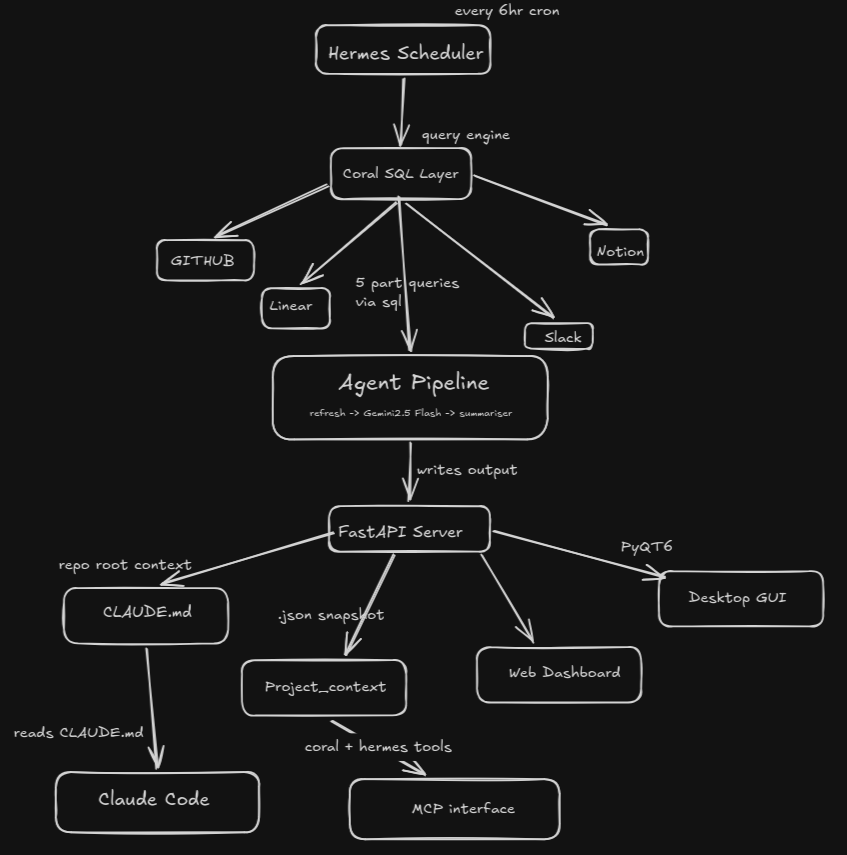
Sorelax is an autonomous background agent that queries GitHub, Linear, Slack, and Notion via Coral SQL, summarises results with the Gemini API, and writes a repo-root CLAUDE.md so AI coding tools always have up-to-date project context.
- Refresh pipeline: Runs
agent/queries/project_state.sqlagainst Coral, passes rows to Gemini (gemini-2.5-flash), writes:~/.sorelax/project_context.json— structured context snapshot~/.sorelax/project_log.jsonl— append-only refresh historyCLAUDE.md— human/AI-readable context in the current repo root
- On-demand Q&A: Keyword-based Coral queries (
sorelax ask) using 5 split part-queries (on_demand_part1–5.sql) merged in Python (Coral does not supportUNION ALL) - REST API: FastAPI server (
agent/api.py) on port 8081 — powers the web dashboard; streams refresh events via SSE - Web Dashboard: Vite + React 19 + TypeScript frontend in
website/— connects to the API atlocalhost:8081 - Desktop GUI: PyQt6 dark desktop app (
gui/) with Tokyo Night theme, setup wizard, and live log tailing - Scheduled refresh: Hermes Agent cron every 6 hours (recommended), or
sorelax start(local APScheduler fallback) - MCP: Coral and Hermes exposed to Claude Code / Cursor for on-demand SQL and context queries
| Requirement | Notes |
|---|---|
| Python 3.10+ | |
| Coral on PATH | curl -fsSL https://withcoral.com/install.sh | sh |
| Node.js 18+ & npm | For the web dashboard |
| PyQt6 (optional) | For the desktop GUI only |
| Hermes Agent (optional) | Installed by ./install.sh or manually |
Coral sources to connect: github, linear, slack, notion
Tokens in repo-root .env — see .env.example.
git clone https://github.com/manthanawgan/sorelax.git
cd sorelax
./install.sh
The installer will:
- Check dependencies (
curl,pip,coral) - Install the Python package (
pip install -e .) - Create
~/.sorelax/ - Prompt for API tokens and write
.env - Add Coral sources (github, linear, slack, notion)
- Set up Hermes (config, skill, 6h cron job)
- Optionally write Claude Code MCP config (
~/.claude/claude_code_mcp_config.json) - Run the first context refresh
git clone https://github.com/manthanawgan/sorelax.git
cd sorelax

# Install Python package (registers all console scripts)
pip install -e .

# Copy and fill in credentials
cp .env.example .env
# Edit .env with your tokens

# Install Coral (if not already installed)
curl -fsSL https://withcoral.com/install.sh | sh

# Connect Coral sources
coral source add github --token <GITHUB_TOKEN>
coral source add linear --token <LINEAR_API_KEY>
coral source add slack  --token <SLACK_TOKEN>
coral source add notion --token <NOTION_API_KEY>hermes model # configure your LLM provider for Hermes
hermes gateway # start the 6h scheduler daemon (keep running)
hermes cron list # verify "Sorelax 6h Context Refresh" is registeredsorelax refresh # run full Coral → Gemini → CLAUDE.md pipeline
sorelax ask "what changed in auth?" # on-demand keyword Q&A via Coral
sorelax status # show last refresh time, scheduler state, source health
sorelax logs # print last 10 refresh log entries
sorelax start # start background APScheduler daemon (every 6h)
sorelax stop # stop the daemonsorelax-api # starts FastAPI on http://127.0.0.1:8081
# or directly:
python -m agent.apiKey endpoints:
| Method | Path | Description |
|---|---|---|
GET |
/api/health |
Liveness check |
GET |
/api/status |
Agent state, scheduler, source health |
GET |
/api/context |
Latest project_context.json |
GET |
/api/logs |
Git commit log (falls back to project_log.jsonl) |
POST |
/api/refresh |
Trigger refresh — returns SSE stream |
POST |
/api/ask |
On-demand Q&A {"question": "..."} |
POST |
/api/scheduler/start |
Start the background daemon |
POST |
/api/scheduler/stop |
Stop the background daemon |
# Start the API first, then the frontend dev server:
sorelax-api &                       # or: uvicorn agent.api:app --port 8081
sorelax-website                     # opens http://127.0.0.1:5173/dashboard

# Or run the Vite dev server directly:
cd website
npm install                         # first run only
npm run dev
Build for production:
cd website
npm run build # outputs to website/dist/PyQt6 is an optional dependency not pulled in by the base install:
pip install PyQt6
pip install -e .       # re-install to register sorelax-gui script
sorelax-gui            # launches the GUI
# or:
python -m gui.main
First-run wizard opens automatically when no .env is found:
| Step | What happens |
|---|---|
| 1 — Dependency Check | Verifies curl, pip, and coral are on PATH |
| 2 — Credentials | Collects all 7 tokens with password echo |
| 3 — Install Progress | Runs the full install pipeline in a background thread |
| 4 — Done | Shows hermes model / gateway commands, opens the main dashboard |
Dashboard panels:
| Panel | Description |
|---|---|
| Dashboard | Source health dots, last-sync time, countdown timer, Refresh Now / Start-Stop buttons, live console |
| Ask Sorelax | Natural-language Q&A streamed from sorelax ask, with session history sidebar |
| Context Explorer | Scrollable cards from ~/.sorelax/project_context.json |
| Live Logs | Auto-scrolling tail of ~/.sorelax/project_log.jsonl with Pause/Resume |
| Settings | 7 credential fields (password mode, Show/Hide toggle), Save applies Coral sources off-thread |
hermes gateway               # background daemon for cron jobs
hermes cron list             # list registered jobs
hermes cron run <job_id>     # manual refresh via Hermes
hermes cron pause <job_id>
hermes cron resume <job_id>set -a && source .env && set +a
python3 agent/refresh.pySorelax/
├── agent/
│ ├── api.py # FastAPI REST server (port 8081), SSE refresh stream
│ ├── coral_client.py # coral SQL subprocess wrapper; merges multi-query results in Python
│ ├── generate_context.py # renders CLAUDE.md from project_context.json
│ ├── refresh.py # full pipeline orchestrator (Coral → Gemini → persist → CLAUDE.md)
│ ├── summariser.py # calls Gemini (gemini-2.5-flash), normalises JSON output
│ └── queries/
│ ├── project_state.sql # main refresh query (GitHub + Linear + Slack + Notion JOIN)
│ ├── on_demand.sql # original combined on-demand query (reference only)
│ ├── on_demand_part1.sql # GitHub commits keyword query
│ ├── on_demand_part2.sql # GitHub PRs keyword query
│ ├── on_demand_part3.sql # Linear issues keyword query
│ ├── on_demand_part4.sql # Slack messages keyword query
│ └── on_demand_part5.sql # Notion docs keyword query
├── cli/
│ ├── main.py # Typer CLI (sorelax command: refresh, ask, status, logs, start, stop)
│ ├── scheduler.py # APScheduler daemon (INTERVAL_HOURS=6), PID file management
│ ├── display.py # Rich terminal display helpers
│ └── website.py # sorelax-website entry point (launches Vite dev server)
├── gui/
│ ├── main.py # GUI entry point — wizard if no .env, else dashboard
│ ├── wizard.py # PyQt6 4-step setup wizard
│ ├── dashboard.py # PyQt6 main dashboard (Tokyo Night theme)
│ └── backend.py # GUI ↔ agent bridge (threads, subprocess calls)
├── hermes/
│ ├── skills/sorelex-refresh/ # Hermes SKILL.md for automated 6h cron
│ ├── config.yaml # Hermes config template
│ ├── setup_hermes.sh # installs Hermes binary
│ ├── register_cron.sh # registers 6h cron job in Hermes
│ └── claude_code_mcp_config.json
├── website/ # Vite + React 19 + TypeScript dashboard
│ ├── src/
│ │ ├── App.tsx
│ │ ├── pages/
│ │ ├── features/
│ │ └── components/
│ ├── package.json
│ └── vite.config.ts
├── tests/
│ └── test_agent.py # unittest suite (coral_client, generate_context, summariser, refresh)
├── install.sh # one-command setup script
├── pyproject.toml # package config; registers sorelax, sorelax-api, sorelax-website, sorelax-gui
├── requirements.txt
├── .env.example
├── CLAUDE.md # auto-generated by sorelax refresh
└── TEAMMATES.md # quick teammate onboarding guide
| Variable | Required | Purpose |
|---|---|---|
GITHUB_OWNER |
yes | GitHub org/user for Coral github.* tables |
GITHUB_REPO |
yes | Repository name |
GEMINI_API_KEY |
yes | Gemini summarisation (gemini-2.5-flash) |
GITHUB_TOKEN |
for Coral | GitHub source authentication |
LINEAR_API_KEY |
for Coral | Linear source |
SLACK_TOKEN |
for Coral | Slack source (xoxb-…) |
NOTION_API_KEY |
for Coral | Notion source |
Copy .env.example to .env and fill in your values:
cp .env.example .env| Command | Module | Description |
|---|---|---|
sorelax |
sorelax_cli.main:main |
Main Typer CLI |
sorelax-api |
agent.api:start |
FastAPI REST server on port 8081 |
sorelax-website |
sorelax_cli.website:main |
Vite dev server launcher |
sorelax-gui |
gui.main:launch |
PyQt6 desktop app |
pip install -e .
python -m pytest tests/
# or:
python -m unittest discover tests/
The test suite covers coral_client, generate_context, summariser, and refresh — all with mocked subprocess/Gemini calls (no live Coral or Gemini required).
Coral — direct SQL across sources:
{ "command": "coral", "args": ["mcp-stdio"] }Hermes — Sorelax context agent:
{ "command": "hermes", "args": ["mcp", "serve"] }Copy hermes/claude_code_mcp_config.json to ~/.claude/claude_code_mcp_config.json or merge into your existing MCP config.
Hermes (recommended): re-create the cron job with a new schedule:
hermes cron list                    # note the job id
hermes cron create "0 */2 * * *" "sorelax refresh" \
  --skill sorelex-refresh \
  --name "Sorelax 2h refresh" \
  --workdir "$(pwd)"
Local APScheduler fallback: change INTERVAL_HOURS in cli/scheduler.py:
INTERVAL_HOURS = 6 # change to desired intervalAfter a successful sorelax refresh:
| File | Description |
|---|---|
CLAUDE.md |
Auto-generated context in repo root (read by AI tools) |
~/.sorelax/project_context.json |
Structured context snapshot (active work, commits, PRs, etc.) |
~/.sorelax/project_log.jsonl |
Append-only log of every refresh run |
~/.sorelax/sorelax.pid |
PID file written by sorelax start daemon |
| Problem | What to do |
|---|---|
| Missing env var | Check .env in repo root; need GITHUB_OWNER, GITHUB_REPO, GEMINI_API_KEY |
| Coral returns 0 rows | coral source list — reconnect sources |
coral not found |
curl -fsSL https://withcoral.com/install.sh | sh |
| Cron never runs | Is hermes gateway running? hermes cron list |
hermes not found |
bash hermes/setup_hermes.sh |
| Gemini JSON errors | Verify GEMINI_API_KEY; Sorelax retries once automatically |
| API port conflict | Port 8081 in use; edit agent/api.py uvicorn.run(... port=8081) |
| Website can't connect to API | Ensure sorelax-api is running on port 8081; CORS allows localhost:5173 |
PyQt6 not found |
pip install PyQt6 then pip install -e . |
npm not found |
Install Node.js from nodejs.org |
MIT