Pure Front-end · No Back-end · Offline Capable · HTTPS Decryption · Millions of Packets in Seconds



🌐 Official Website / Live Demo :
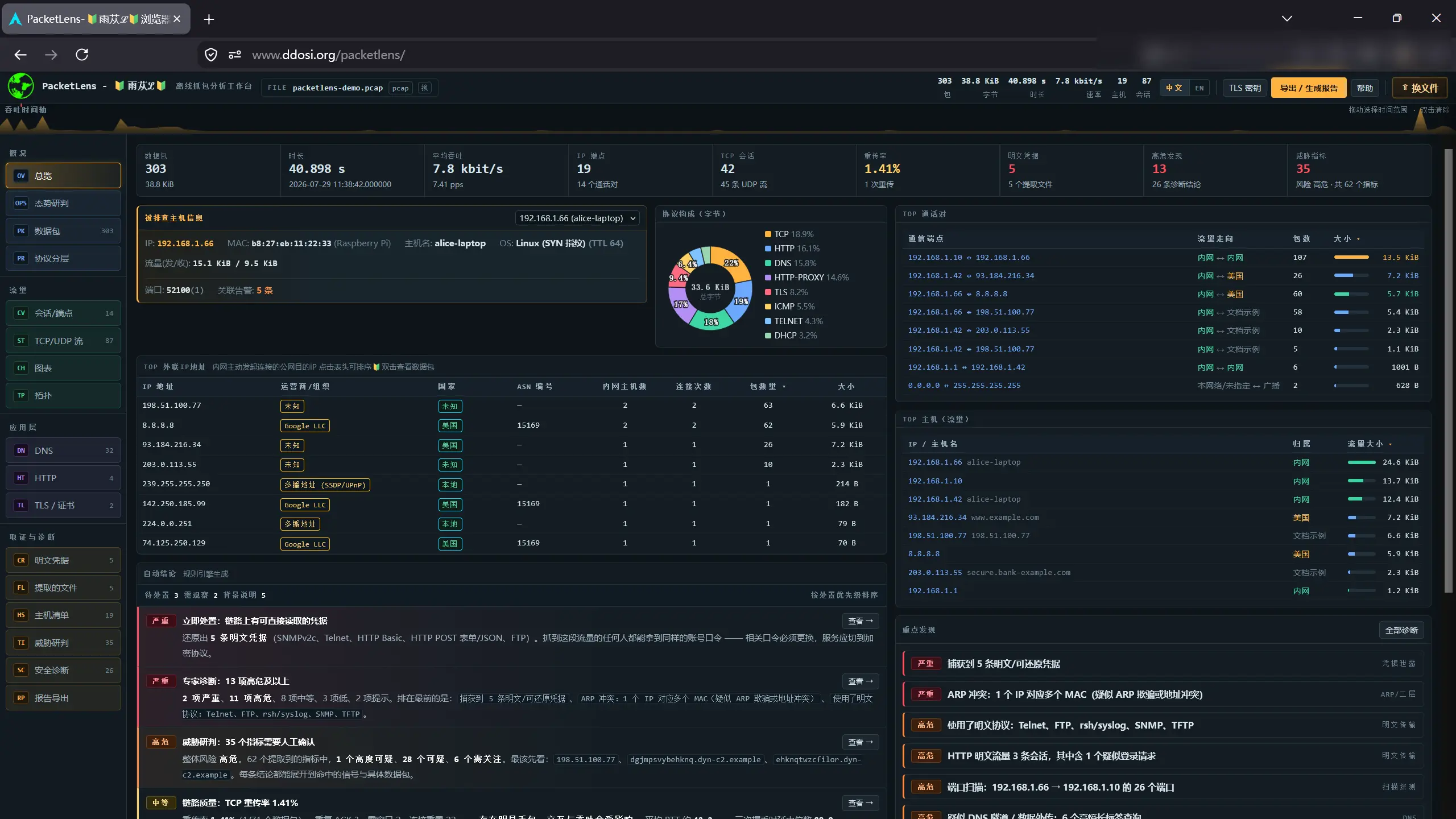
No environment setup or back-end server is required. Simply open the HTML file or drag and drop a pcap file into the web page to complete the entire workflow from low-level protocol decoding to high-level threat triage. All data is processed locally in the browser and never uploaded, ensuring absolute data security.
- 🔍 Byte-level Protocol Tree Decoding: Supports hundreds of protocols including Ethernet/IPv4/IPv6/TCP/UDP/HTTP/TLS/DNS. Features Wireshark-style field trees with bi-directional hex highlighting.
- 🔓 Deep HTTPS Decryption: Supports importing
SSLKEYLOGFILEor reading pcapng embedded key blocks (DSB). Implements TLS 1.2/1.3 (AES-GCM, ChaCha20-Poly1305) decryption with a built-in HTTP/2 HPACK engine to restore plaintext requests and responses. - 🕵️ Forensics & Credential Extraction: Automatically extracts credentials from plaintext protocols (HTTP/FTP/Telnet); deeply parses JSON request bodies; built-in regex engine dynamically extracts high-value sensitive info like phone numbers, ID cards, JWT tokens, and cloud provider AccessKeys.
- 🛡️ Threat Intelligence & Triage: Built-in 40+ expert diagnostic rules (port scanning, ARP spoofing, DNS tunneling, beaconing, etc.). Performs offline threat scoring on IPs/Domains/JA3/Certs/Files; supports importing local IoC libraries and allowlists.
- 🚀 Extreme Performance & Memory Optimization:
- Utilizes Web Worker multi-threaded parsing for zero main-thread blocking.
- Pioneering "use-and-discard" memory management strategy, supporting instant loading of millions of packets.
- DOM virtual scrolling and V8 engine low-level optimization, reducing memory footprint to the theoretical limit.
- 📊 Visualization & Report Export:
- Interactive communication topology (force-directed layout).
- Situation awareness console (attack chain stage categorization, asset risk convergence).
- One-click export of beautifully formatted HTML/Markdown analysis reports.
- 🌍 IP Geolocation & ASN: The full version includes IP databases (
GeoLite2-Country.mmdbanddbip-asn-lite-*.mmdb), supporting direct display of IP country and ASN operator information within the UI.
Due to browser security policies restricting local file access (.mmdb), local deployment is required to use the full version with IP geolocation.
-
Download the latest version from the Releases page.
-
Install the Python environment.
-
Use either of the following methods to start the server:
Method A: HTTP Access (Simplest)
Run the command in the extracted directory:
python -m http.server 80
Access in browser: http://localhost/ or http://127.0.0.1/
Method B: HTTPS Access (Recommended for full functionality)
Run the included script in the extracted directory:
pip install cryptography
python https.py
The script will automatically use system openssl to generate a certificate and start the service. Access in browser: https://localhost:8443/ (The browser will prompt a security warning; choose to proceed/ignore).
Modern TLS uses ECDHE forward secrecy; the capture file alone cannot be decrypted. You need to obtain the session keys from the client side:
- Browsers/curl: Set the environment variable
SSLKEYLOGFILE=/path/to/keys.logbefore launching. - Node.js: Add the
--tls-keylog=/path/to/keys.logargument when starting. - Import to Tool: Drag the
keys.logfile directly into the PacketLens page, or click the "TLS Keys" button in the top right to import. The tool will automatically decrypt and re-run the full application-layer analysis pipeline.
PacketLens is entirely written in Vanilla JavaScript with zero external framework dependencies. To handle massive traffic, we implemented hardcore optimizations at the lowest level:
- Zero-Allocation Protocol Tree: During the statistics phase, no array objects are created; strings are concatenated directly, eliminating GC pauses for millions of packets.
- Worker Communication Downscaling: After parsing, the Worker strips deep properties from packet objects, passing only basic display data to the main thread. The main thread rebuilds views on-demand via
ArrayBuffer.subarray, reducing transfer overhead from GBs to MBs. - Ultra-Fast IP Filtering: During low-level parsing, IPv4 addresses are pre-converted to 32-bit unsigned integers. Filtering performs mathematical comparisons, bypassing massive string regex matching and boosting performance by over 10x.
- Data Privacy: This tool runs purely locally and will never send your pcap data to any third-party server. However, please note that extracted credentials, decrypted plaintext, and other sensitive info are cached in the browser's memory and destroyed when the page is closed.
- Legal Use: This tool is intended solely for cybersecurity learning, teaching, and legally authorized security testing. Do not use it for any illegal purposes. Users bear all legal responsibility arising from improper use of this tool.
Issues and Pull Requests are welcome! If you have needs for new protocol parsing, find bugs, or have better ideas for performance optimization, please feel free to contact me.
This project is open-sourced under the MIT License.
Powered by www.ddosi.org 🔰雨苁ℒ🔰