







blitcp is the new name of fast-copy (renamed in v4.0.0 — "blit" as in bit-block transfer, which is what the block-order engine does). Existing installs upgrade in place via
--update; on-disk state andFAST_COPY_*environment variables keep working. See the CHANGELOG.
A fast, cross-platform tool for copying files and directories at maximum sequential disk speed — built for USB drives, external HDDs, NAS backups and large SSH transfers. CLI + desktop GUI, in 7 languages.
| Problem | Solution |
|---|---|
cp -r is slow on HDDs due to random seeks |
Reads files in physical disk order for sequential throughput |
| Thousands of small files copy painfully slow | Bundles small files into tar stream batches |
| Duplicate files waste space and time | Content-aware dedup — copies once, hard-links or reflinks the rest |
| No space check until copy fails mid-way | Pre-flight space check before any data is written |
| Copies that quietly fail half-way | Post-copy verification — a local copy re-reads every copied file and hashes its content against the source; remote and cloud destinations get existence, size and a hashed sample. Either way the run ends on an exit code a script can act on |
| Copying between two servers is painful | Remote-to-remote relay via SSH tar pipe streaming |
| SFTP is disabled, or the box has nothing installed on it | Raw SSH tar streaming using the remote's own tar — duplicates hard-linked on the far side rather than sent twice |
pip install blitcp            # CLI — zero dependencies, Python 3.8+

blitcp /data /media/usb/data                # local → local
blitcp /data user@host:/backup              # local → remote over SSH
blitcp user@host:/data s3://bucket/backup   # any combination of local/SSH/cloud
blitcp --help                               # everything else
Optional: pip install paramiko for SSH, blitcp[cloud] for S3/Azure/GCS/SMB,
xxhash for ~10× faster hashing. Prebuilt CLI and GUI binaries for Linux,
macOS and Windows are on the
Releases page — no Python needed.
- Block-order reads — files are read in physical disk order (
FIEMAP/fcntl/FSCTL), eliminating random seeks on HDDs - Reflink copies on btrfs / XFS / APFS / bcachefs — metadata-only CoW clones make a 10 GB same-volume copy complete in milliseconds
- Content-aware deduplication — xxHash-128/SHA-256; each unique file is copied once, duplicates become hard links or reflinks, with a cross-run SQLite cache
- SSH transfers without SFTP — tar batches over raw SSH channels, local↔remote and remote↔remote relay (streamed through your machine, never stored)
- Cloud object storage —
s3://,az://,gs://as source or destination, with encrypted saved connections and a built-in passphrase generator - SMB / UNC shares — copy straight to
\\server\sharewith saved credentials - Sparse-file awareness — VM images copied via
SEEK_DATA/SEEK_HOLE; holes never hit the wire - Faithful metadata — permissions, timestamps, owner, xattrs and POSIX ACLs / NTFS DACLs+ADS, matching
cp -a - Safety rails — pre-flight space check, post-copy verification with proper exit codes, honest dedup accounting on FAT32/exFAT
--use-sudoself-elevation with a tamper-resistant (chattr +i) JSONL audit log- Interface in 7 languages — English, Ελληνικά, 中文, Deutsch, Italiano, Español, 日本語
- Multiple sources, globs, single-file renames —
cp -r-style ergonomics across every mode - Works on Linux, macOS, Windows (long paths included) · Synology/busybox-friendly · self-updating
| Scenario | Result |
|---|---|
| Linux, 12,347 small files, cold HDD → SSD | 2.5× faster than cp -ar (5.9s vs 15.0s, dedup+verify ON) |
| Windows, 9,578 files off USB 2.0 | 1.3× faster than robocopy (2m28s vs 3m16s /MT:1, verification ON) |
| SSH, 1,098 files / 1.1 GB over LAN | Level with scp -r (1m50.4s vs 1m55.4s, verify+dedup ON) via tar streaming — single run |
Full methodology and more scenarios: blitcp.dev/benchmarks · DOCUMENTATION.md
The SSH row is one run, not a median of three, and to a Windows drive through
WSL scp was ahead. Over SSH blitcp is not sold on speed: what it adds is
verification, dedup and a resumable second run.
Both runs, with the caveats.
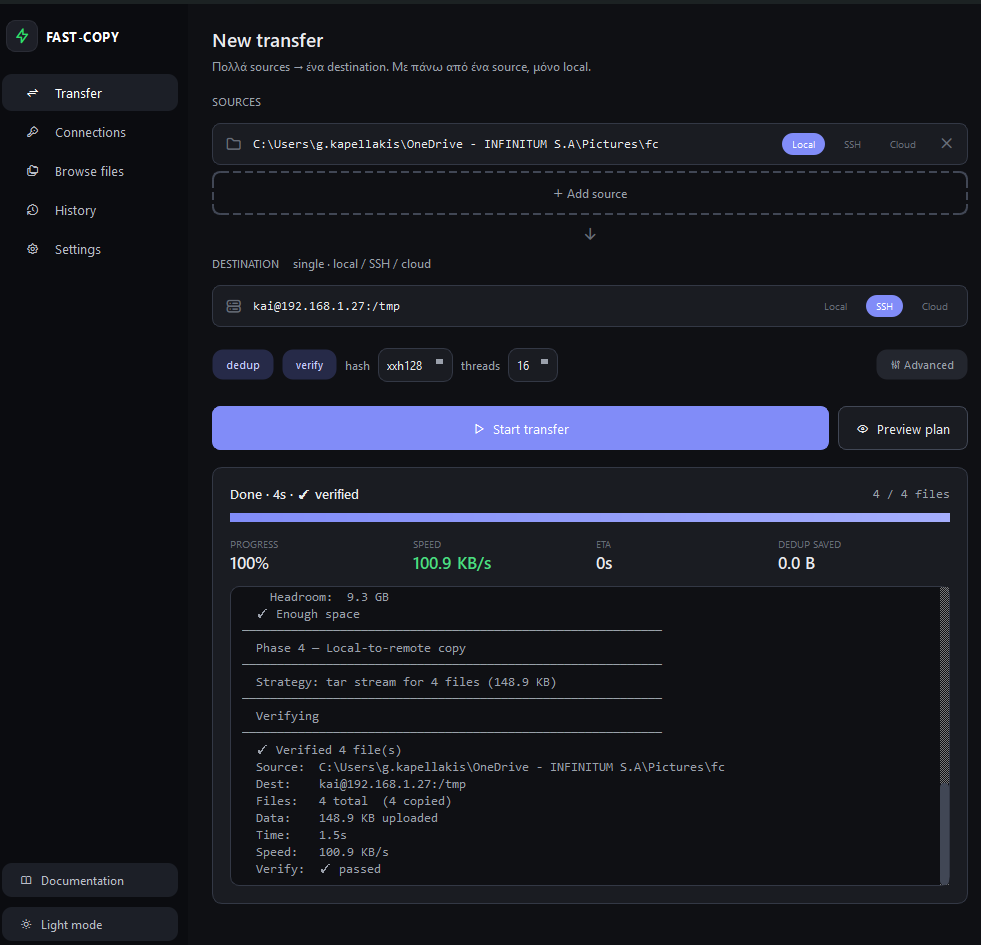
pip install "blitcp[gui]" && blitcp-guiTransfers, saved connections, file browser, history and settings — same engine, point and click. More screenshots →
- blitcp.dev/docs — guides: local copies, SSH transfers, cloud storage, sparse files, everyday options
- DOCUMENTATION.md — the full manual: every option, how it works internally, examples, benchmarks
- CHANGELOG.md — release history
- 简体中文 — README.zh-CN.md · DOCUMENTATION.zh-CN.md · glossary.zh-CN.md
blitcp is free and Apache-2.0 licensed, and stays that way. Donations via Ko-fi or Liberapay go towards the Windows code signing certificate, hosting for blitcp.dev, and the hardware the published benchmarks run on. Starring the repository or filing a good bug report helps just as much.
Apache License 2.0 — see LICENSE. The --index-existing /
--dedup-existing features were contributed by
York-Simon Johannsen (#3).