
This uses a sunburst chart to visualize disk space usage on Windows.
It is modelled after Scanner, Diskitude, and other similar disk space viewers.
The name "Elucidisk" is a portmanteau of "elucidate" and "disk".
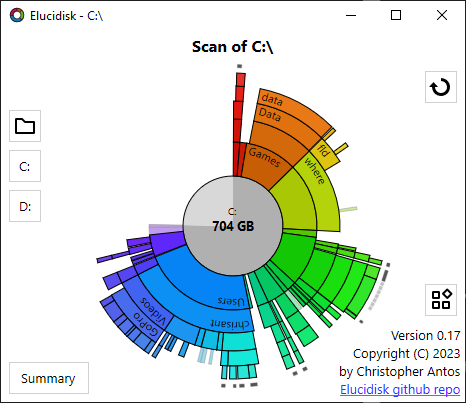
- Scans drives or folders to find the size used.
- Shows the results in a sunburst chart.
- The chart has several configurable options:
- Use plain colors.
- Use rainbow colors (based on angle in the sunburst).
- Use heatmap colors (based on size).
- Show/hide names of files and directories in the sunburst (if the name fits).
- Show/hide free space for drives.
- Use the actual compressed size for compressed files, instead of the uncompressed size.
- Show arcs with proportional area (e.g. two arcs for 50 GB directories will have the same area, even if they are at different distances from the center).
- Show size comparison bar when hovering over an arc (the comparison bars are always in the center ring, so their sizes are comparable even when Proportional Area is turned off).
- Show combined summary chart for all local drives.
- Right click on an arc for a context menu of available actions.
- Right click elsewhere for a context menu of configurable options (or press Shift-F10 or Apps key).
Please feel free to open issues for suggestions, problem reports, or other feedback.
If you want to contribute, fork the repo and create a topic branch, and send a pull request for your topic branch. Also, consider opening an issue first and discussing the contribution you want to make.
Run elucidisk to launch the program and scan the current drive.
You can optionally pass one or more drives or directories to scan as command
line arguments (e.g. elucidisk d: "c:\Program Files" c:\Windows).
When viewing a sunburst chart of disk space usage, I want the free space on a disk to show up in the chart. The only sunburst disk space visualizer I could find that includes the free space is Scanner.
I also wanted a few improvements to the user interface, such as highlighting the arc under the mouse pointer and showing names of directories/files when the name fits in the arc.
I wanted to use the MIT license. Most disk space visualizers are either proprietary or use a "viral" version of GPL license.
So, I wrote my own.
It is written in C++ and uses DirectX for rendering.
Elucidisk uses Premake to generate Visual Studio solutions. Note that Premake >= 5.0.0-beta8 is required.
- Cd to your clone of elucidisk.
- Run
premake5.exe toolchain(where toolchain is one of Premake's actions - seepremake5.exe --help). - Build scripts will be generated in
.build\toolchain. For example.build\vs2019\elucidisk.sln. - Call your toolchain of choice (Visual Studio, msbuild.exe, etc).