
Open-source Bitcoin mining firmware.
This is a fork of 256foundation/mujina, adapted to run on the Avalon Nano3s (Canaan K230 SoC, dual-core RISC-V64: a big core running a bare-metal RTOS alongside the ASIC chain, and a little core running Linux).
The stock Nano3s ships closed firmware on both cores. This fork replaces it end to end:
rtos_core/-- a from-scratch big-core firmware (rtos_core.elf) that replaces the stock RTOS: ASIC chain enumeration and job/nonce framing over UART, PLL/voltage control, and IPC to the Linux side. Also includesmujina_test_harness.c, a Linux-side helper for power/fan control (real duty-based PWM control on the board's fan channel, driven by a proportional+integral controller against the chip's real thermal limits).mujina-miner/src/board/nano3s.rs-- the board driver wiring this hardware into Mujina's normal scheduler/job-source/API pipeline, same as any other supported board.- A web dashboard (served by
mujina-minerditself) with live telemetry, tuning, and fan control specific to this board.
Everything here was built by independently reverse-engineering the device's real behavior -- device-tree GPIO/PWM mapping, the ASIC UART wire protocol, PLL/voltage calibration tables, real fan hardware characteristics.
This installs custom firmware on both cores of a real device. Two ways to get there: flash a pre-built image (fastest, no build environment needed), or build from source and deploy over SSH (below, for development).
Download nano-mujina-alpha-v3.kdimg (123MB, see the release notes for what's in it -- pool config page, outlet-temp display, a PLL temp-target throttle, a user-editable fan curve, and a network firmware updater) and burn it with the same official K230 Burning Tool Canaan's own flashing instructions use. Unlike the stock image, no WiFi credentials or other device-specific data are baked in -- the device boots straight into first-time BLE setup.
-
Get the burning tool:
Windows -- K230BurningTool-Windows-v2.1.0 (unzip it, no install needed), a GUI tool.
Linux / macOS --
k230-flash, the same vendor's official cross-platform CLI (and optional GUI):pip install k230-flash
On Linux, add a udev rule first so it doesn't need
sudo:echo 'SUBSYSTEM=="usb", ATTRS{idVendor}=="29f1", ATTRS{idProduct}=="0230", MODE="0666"' | sudo tee /etc/udev/rules.d/99-k230.rules sudo udevadm control --reload-rules && sudo udevadm trigger
On macOS it works out of the box (
brew install libusbif you hit permission errors). A GUI build (AppImage on Linux) is also on that repo's Releases page if you'd rather not use the CLI. -
Open and select the image:
Windows -- run
K230BurningTool.exe, click Open, selectnano-mujina-alpha-v3.kdimg, set Image part name to "all", and set Medium to "SPI NAND".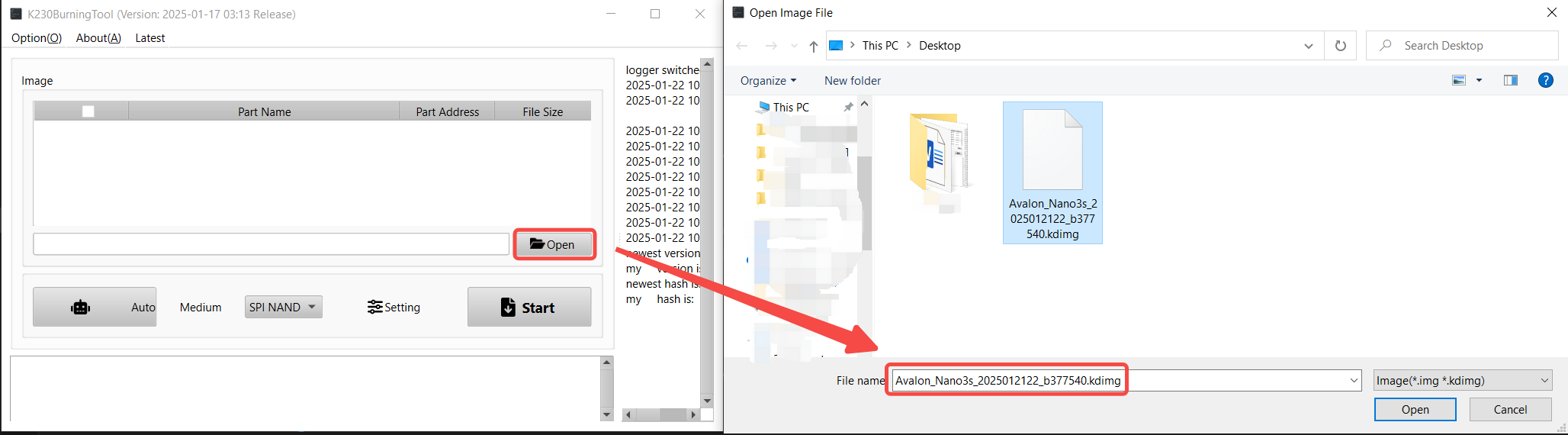
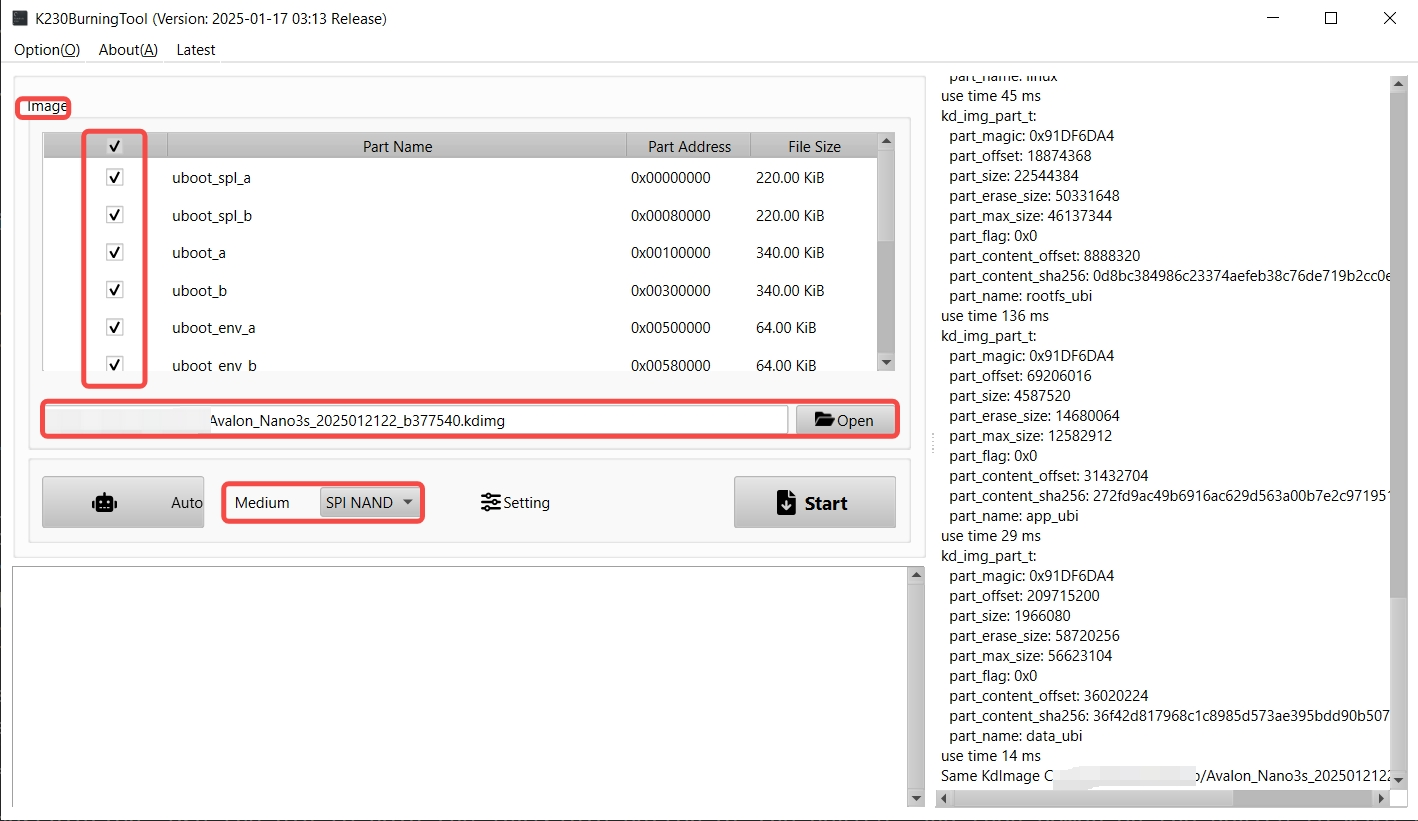
Linux / macOS -- put the device in burn mode first (step 3 below), then run:
k230-flash -m SPI_NAND nano-mujina-alpha-v3.kdimg
k230-flash --list-devicesconfirms it's detected before flashing, if you want to check first. -
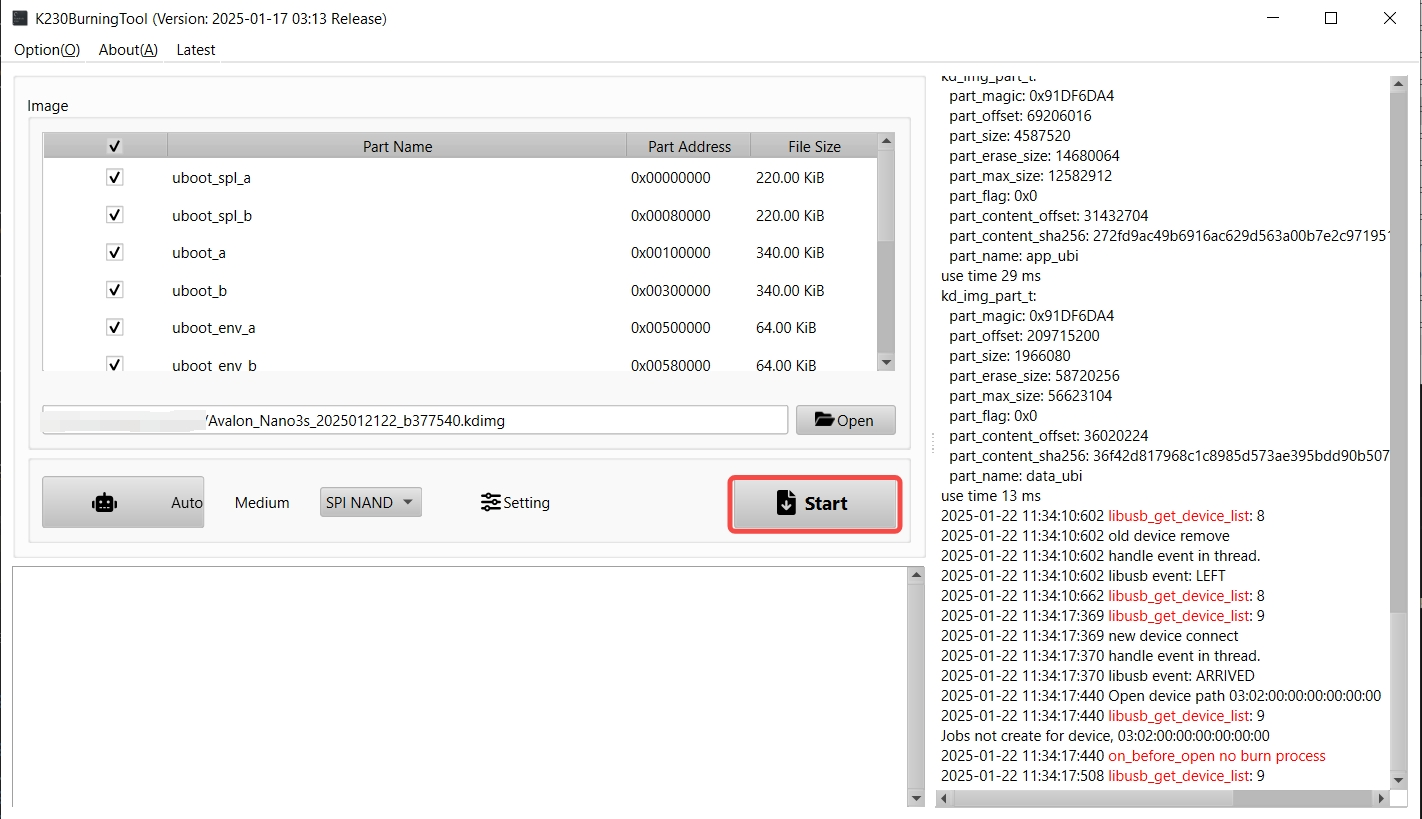
Put the device in burn mode: use a double type-A USB cable to connect the Nano3s to your PC, hold the recessed button, then power the device on while still holding it.
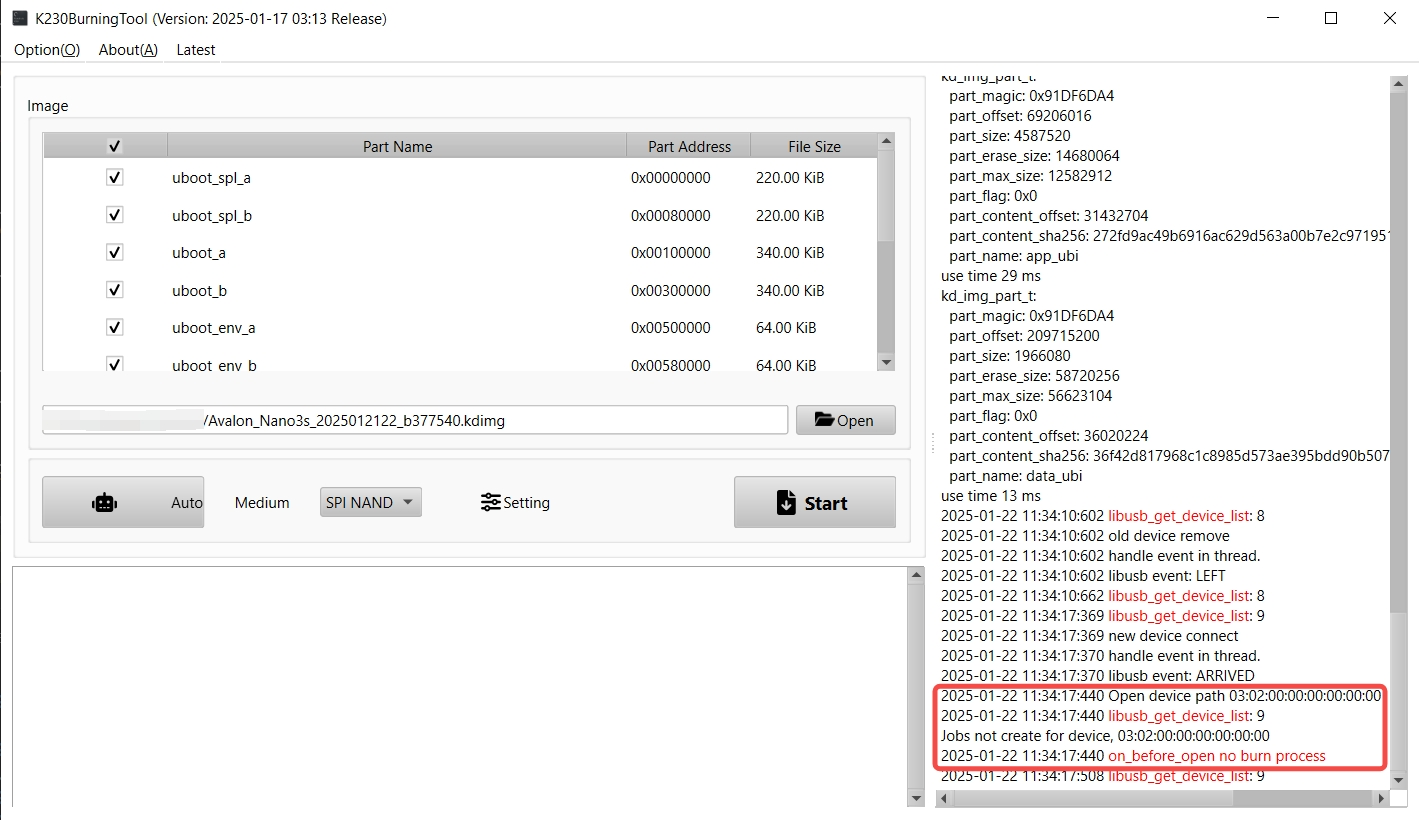
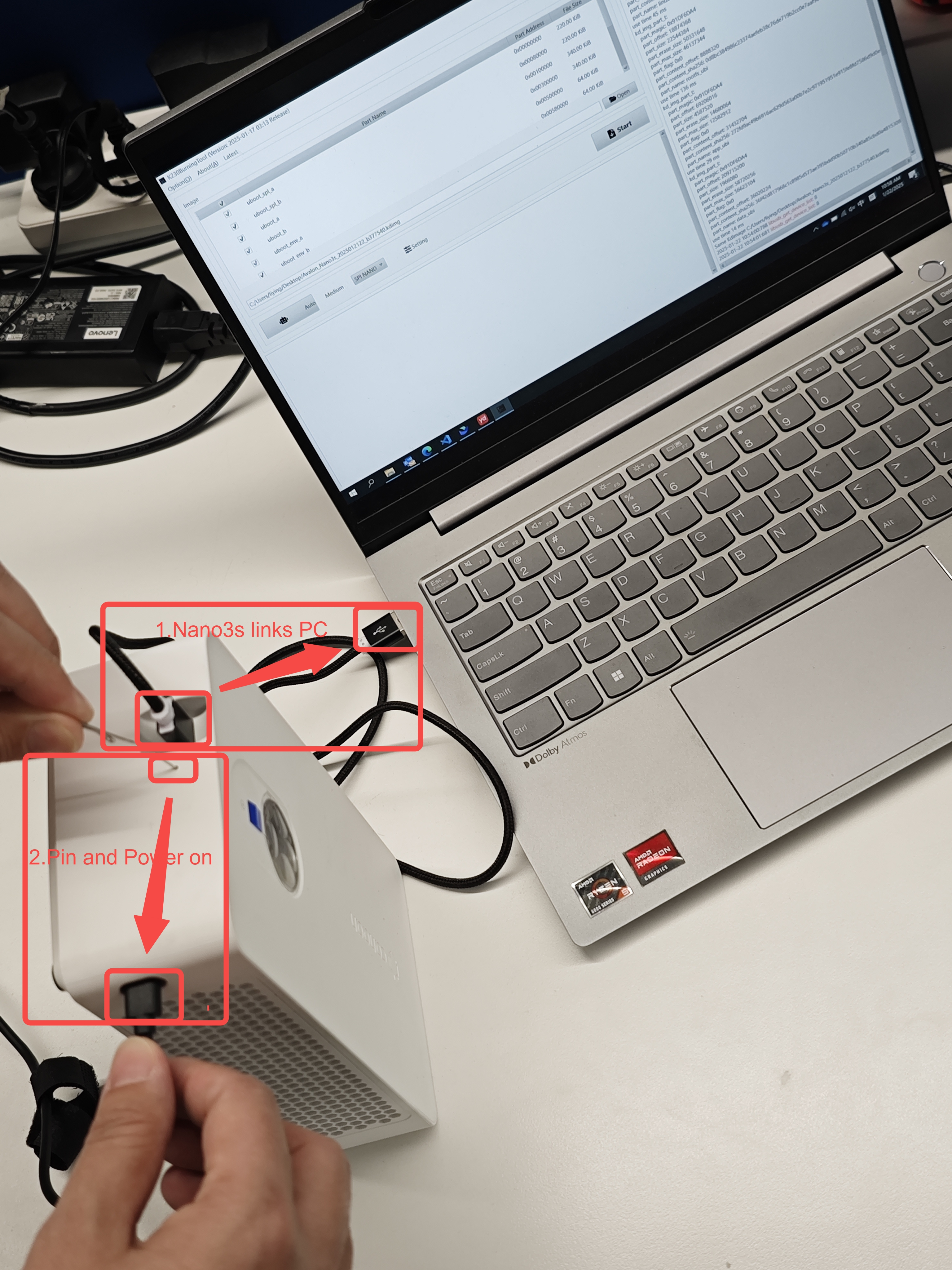 On Windows, the tool's debug box on the right confirms burn mode
once it's detected.
On Windows, the tool's debug box on the right confirms burn mode
once it's detected.
 On Linux/macOS,
 k230-flash(run just before this step, or already running and waiting) detects it automatically -- no separate action needed. -
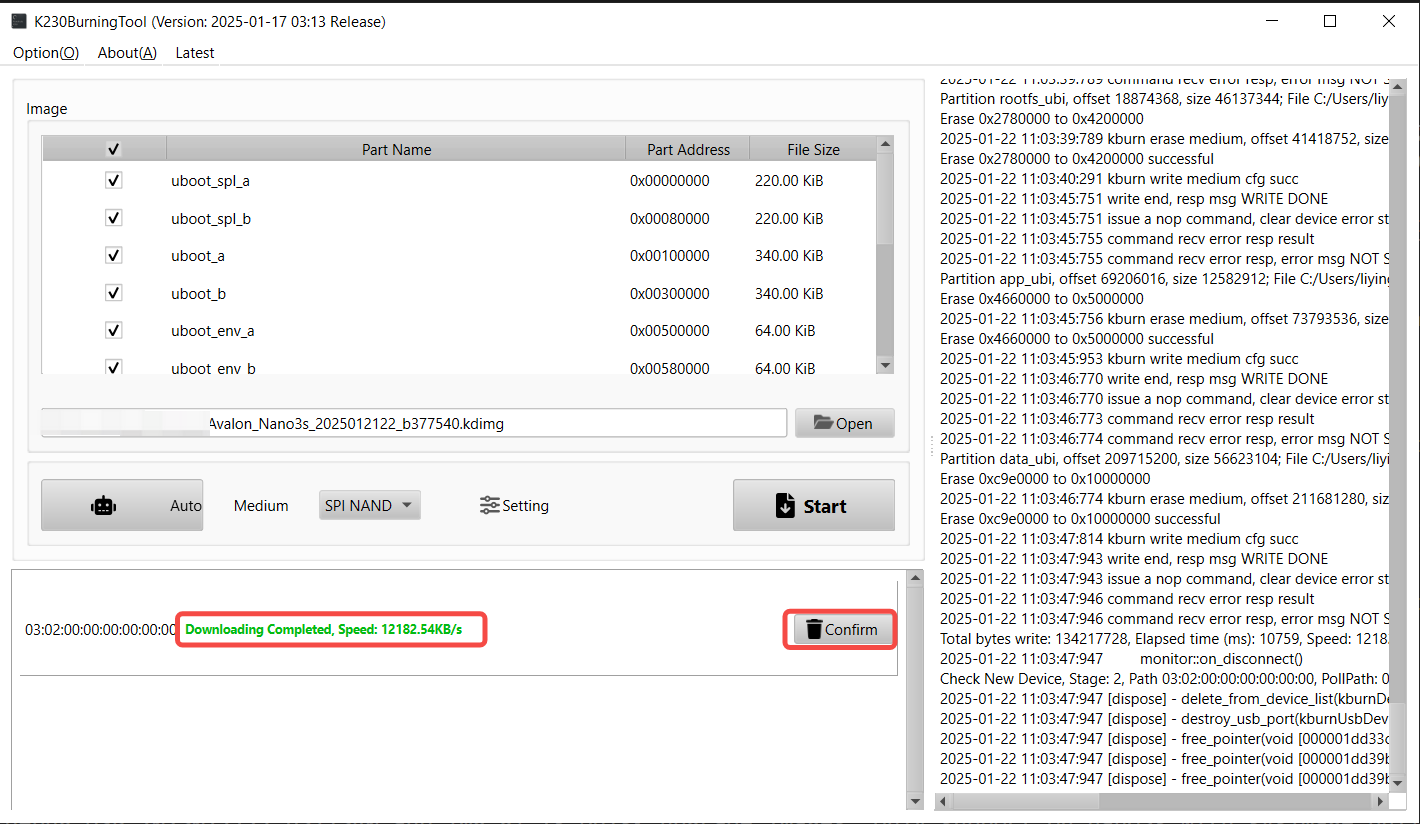
Start the flash and wait: on Windows, click Start and wait a few minutes until "Downloading Completed" appears.
 On Linux/macOS,
 k230-flashstarts writing as soon as it detects the device (step 2 above) and shows its own progress bar -- nothing further to click. -
First boot: the device comes up advertising over Bluetooth (look for a name starting
nan3s_in the official Avalon Family app -- also on the App Store), with the LCD showing a setup progress ring. Connect, enter your WiFi network's SSID and password in the app, and the device joins your network and starts mining -- the LCD tracks each step (waiting for phone, credentials received, connecting, connected). No serial console or SSH access needed.
Burning-tool screenshots and the recovery-pin photo above are from Canaan's own Avalon_Nano3s repository, since it's literally the same official tool.
If you've already flashed and set up a Nano3s, you don't need to
re-burn the whole image for a software update. Download
nano-mujina-alpha-v3-bundle.bin
and either upload it from the device's own dashboard (/firmware
page), or:
curl -X POST --data-binary @nano-mujina-alpha-v3-bundle.bin \
  -H "Content-Type: application/octet-stream" \
  http://<device-ip>/api/v0/firmware/bundle
This updates both mujina-minerd and the fan/power harness in a
single reboot and keeps everything else as-is -- WiFi, pool config,
fan curve. No USB cable, no burning tool, no BLE re-setup.
The rest of this section covers building both firmwares yourself and deploying over SSH -- useful for development, or if you want to modify the firmware before flashing.
Two separate toolchains are needed, one per core:
- Big core (
rtos_core.elf): a real musl RISC-V64 cross-compiler (not glibc -- a glibc binary silently fails to start under RT-Smart'smsh). Get one from e.g. musl.cc'sriscv64-linux-muslcross toolchain. PointTOOLCHAIN_BINat itsbin/directory, or extract it to../toolchain/riscv64-linux-musleabi_for_x86_64-pc-linux-gnu/next to this repo (rtos_core/build_wsl.sh's default). - Little core (
mujina-minerd): theriscv64gc-unknown-linux-gnuRust target (rustup target add riscv64gc-unknown-linux-gnu) plus ariscv64-linux-gnu-gcccross-compiler and a matching riscv64 sysroot (forlibudev/libssl) -- seertos_core/tools/build_mujina_minerd.shfor the exactPKG_CONFIG_SYSROOT_DIR/PKG_CONFIG_PATHit expects; adjust the paths there to wherever your sysroot actually lives.
The one vendor dependency rtos_core.elf links against
(libipcmsg_slave.a, Canaan's IPC library) is fetched automatically by
build_wsl.sh the first time you build -- see
rtos_core/tools/install_sdk.sh.
From WSL, with both toolchains on PATH (or their paths set via the
env vars above), one command builds both firmwares and pushes the
entire stack to the device over SSH:
DEVICE_IP=192.168.1.x bash rtos_core/tools/build_and_deploy_all.shThis chains three independently-runnable scripts, if you'd rather run them one at a time or re-run just one after a small change:
bash rtos_core/build_wsl.sh                              # builds rtos_core.elf
bash rtos_core/tools/build_mujina_minerd.sh               # builds mujina-minerd
DEVICE_IP=192.168.1.x bash rtos_core/tools/deploy_stock_to_nano3s.sh  # pushes everything, reboots
deploy_stock_to_nano3s.sh only runs against a device still on stock
firmware (it checks the target's /etc/init.d/rcS first and refuses if
it looks already-migrated), and it backs up the device's original
rcS and mm_miner binary, timestamped, before changing anything --
see the script for exact paths if you ever need to revert.
Once the device reboots, the dashboard is served on port 80:
http://192.168.1.x/
You bought the hardware, but someone else controls the software. Whether you have thousands of machines in a data center or one in your basement, the firmware running them is closed. It comes from the manufacturer or a third-party vendor, and you can't read it, audit it, or change it.
Mujina is here to change that: one open-source codebase to run any hashboard from any vendor on any control board, written by hardware engineers, protocol authors, and mining operators from across the industry. Read every line, modify it without permission, control it through a documented API, and pay no dev fee. Own your firmware.
Mujina is under active development. Today's supported hardware is a starting point:
Working now
- Bitaxe Gamma (single BM1370 ASIC): an open-source single-chip miner. Good for developers and advanced users who want to run Mujina on real hardware today.
- CPU backend: software SHA-256 hashing, no hardware required. Useful for exercising Mujina itself, testing pool and other server software against a working miner client, and teaching the full mining pipeline. See CPU Mining.
Landing now
- EmberOne00 (twelve BM1362 ASICs): a sister project from the 256 Foundation. An open-source hashboard designed to be driven by open firmware.
Near-term targets
- Installable images for the Antminer S19 series
- The 256 Foundation's forthcoming Libreboard control board
- Broader support for commercial mining machines
APIs are still moving and parts of the docs lag the code.
Build Mujina and watch it run end to end, no mining hardware required. On Debian or Ubuntu:
git clone https://github.com/256foundation/mujina.git
cd mujina
sudo apt-get install libudev-dev libssl-dev
MUJINA_CPUMINER_THREADS=1 MUJINA_CPUMINER_DUTY=50 MUJINA_USB_DISABLE=1 \
  cargo run --bin mujina-minerd
In this example, the CPU backend hashes in software against a dummy job source, exercising the full pipeline: job distribution, hashing, share detection, logging, and the API. When you're ready to mine for real, continue below.
Mujina builds with the current stable Rust toolchain. Install the additional packages below for your platform.
On Debian or Ubuntu:
sudo apt-get install libudev-dev libssl-devOther distributions need their equivalents of the udev and openssl development packages.
macOS is supported. Install Xcode Command Line Tools alongside the Rust
toolchain. A build failure on openssl-sys usually means the build
can't find openssl; see the
openssl crate's macOS notes
for the supported installation and environment options.
mujina-miner is a cargo workspace. Build and test it the usual way:
cargo build
cargo test
The workspace contains several binaries: mujina-minerd (the daemon),
mujina-cli, and others. Running requires picking one:
cargo run --bin mujina-minerdIf you'll be working in the repo regularly, install
just (cargo install just) for
shorter aliases that avoid retyping the --bin flag:
just run        # same as cargo run --bin mujina-minerd
just test       # same as cargo test
just checks     # fmt, lint, and test in one step
Examples in the rest of this README use plain cargo so they work
without just installed.
Mujina is currently configured through environment variables. Persistent configuration via the REST API and CLI will follow as those interfaces mature.
Point Mujina at a Stratum v1 mining pool:
MUJINA_POOL_URL="stratum+tcp://pool.example.com:3333" \
MUJINA_POOL_USER="your-address.worker" \
cargo run --bin mujina-minerd
MUJINA_POOL_USER defaults to mujina-testing and MUJINA_POOL_PASS
defaults to x, so only MUJINA_POOL_URL is strictly required.
Omit MUJINA_POOL_URL to use a dummy job source that generates
synthetic mining work. Useful for development without a network
connection.
cargo run --bin mujina-minerdThe default filter emits Mujina log entries at info level and
third-party crates at warn. Two environment variables adjust it.
MUJINA_LOG filters Mujina's own modules, named exactly as the log
output shows them, and a bare level applies to Mujina as a whole.
RUST_LOG keeps its usual Rust meaning: a directive that names a
crate adds to the defaults, and a bare level takes full control of
the filter. MUJINA_LOG wins where the two overlap.
# Default: info for Mujina, warn for third-party crates
cargo run --bin mujina-minerd

# Trace all of Mujina, third-party crates stay at warn
MUJINA_LOG=trace cargo run --bin mujina-minerd

# Trace the Stratum v1 client, everything else unchanged
MUJINA_LOG=stratum_v1=trace cargo run --bin mujina-minerd

# Debug Stratum v1 and trace BM13xx at the same time
MUJINA_LOG=stratum_v1=debug,asic::bm13xx=trace \
  cargo run --bin mujina-minerd

# Trace a third-party crate, Mujina's defaults unchanged
RUST_LOG=nusb=trace cargo run --bin mujina-minerd
Debug shows logical stages and summaries: chip initialization, jobs received from the pool, shares submitted. Trace adds step-by-step execution detail: individual serial frames, I2C transactions, and USB device events.
Mujina logs the API bind address at startup. By default it's
127.0.0.1:7785; set MUJINA_API_LISTEN to change it:
# All interfaces, default port
MUJINA_API_LISTEN="0.0.0.0" cargo run --bin mujina-minerd

# All interfaces, custom port
MUJINA_API_LISTEN="0.0.0.0:9000" cargo run --bin mujina-minerd
See REST API for endpoints and conventions. The
/api/v0/ prefix signals the API is still in flux. Authentication
is on the roadmap.
We welcome contributions! Whether you're fixing bugs, adding features, improving documentation, or simply exploring the codebase to learn about Bitcoin mining protocols and hardware, your involvement is valued.
Please see our Contribution Guide for details on how to get started. For user-oriented discussion and support, visit the Mujina forum. For real-time chat, join our Telegram group---note that Telegram is ephemeral; decisions and important context belong on GitHub.
- Architecture Overview: system design and component interaction
- REST API: endpoints, conventions, and OpenAPI spec
- CPU Mining: the CPU backend in detail
- Container Image: build and run Mujina as a container
- BM13xx Chip Reference: serial protocol, registers, and behavior of the BM13xx mining-chip family
- Bitaxe-Raw Control Protocol: management protocol for Bitaxe board peripherals
- Bitaxe Gamma Board Guide: board hardware, firmware flashing, and Mujina integration
- Nano3s Hardware Register Reference: GPIO/IOMUX/PWM/I2C register map, independently reverse-engineered
- Contribution Guide: process and requirements
- Code Style Guide: formatting and mechanical style
- Coding Guidelines: design patterns and best practices
- Bitaxe: open-source Bitcoin mining hardware
- bitaxe-raw: pass-through firmware for Bitaxe boards required for use by Mujina
- EmberOne00: 256 Foundation's first open-source Bitcoin mining hashboard
- Libreboard: 256 Foundation's open-source mining control board
This project is licensed under the GNU General Public License v3.0 or later. See the LICENSE file for details.