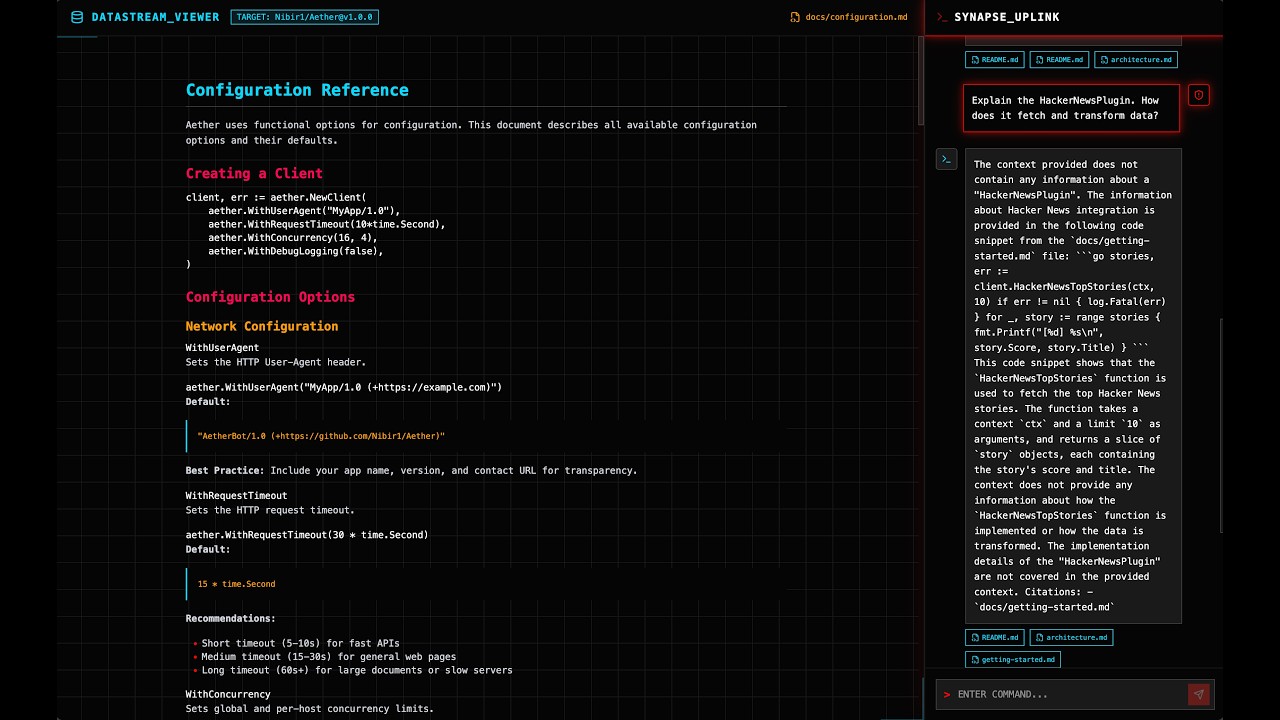
📺 Watch the Architectural Walkthrough featuring autonomous codebase documentation, hallucination-free RAG citations, and an interactive Red Team Astro UI.

-purple)




Maple Synapse is an enterprise-grade, event-driven documentation and intelligence platform. It replaces stale, manually updated engineering wikis with an autonomous system that triggers on GitHub release events, dynamically reverse-engineers codebases using Large Language Models, and serves the resulting intelligence through a low-latency Retrieval-Augmented Generation (RAG) interface.
Designed for modern engineering organizations, Maple Synapse treats documentation as a continuous, automated byproduct of the deployment lifecycle.
- Autonomous Lifecycle: Completely eliminates manual documentation. The system listens for GitHub
releasewebhooks and dispatches ephemeral cloud workers to clone, analyze, and document the new codebase in the background. - Serverless Scale & Optimization: Offloads heavy LLM parsing and vector embedding to Modal.com. Worker executions are heavily optimized using Git shallow cloning (
--depth 1), reducing cloud compute overhead by ~58% and ensuring zero load on the host API server. - Cryptographic Security: Webhook ingestion is locked down via strict HMAC SHA-256 signature validation, preventing spoofing and protecting the Modal compute engine from Denial of Wallet (DoW) attacks.
- High-Fidelity RAG: Combines Qdrant's highly optimized vector search with Claude 3 Haiku to provide context-aware answers with mathematically grounded citations.
- "Red Team" UI & Dynamic Rendering: A high-performance, split-pane interface built on Astro and React. Features dynamic payload rendering—decoding raw Markdown directly from Azure, while automatically hydrating
.jsonand.yamlspecifications into fully interactive Swagger/OpenAPI testing interfaces.
Maple Synapse operates on a decoupled, microservice-based architecture utilizing edge compute and multi-stage containerization.
graph TD
    subgraph "Event & Orchestration Layer (Secured)"
        GH[GitHub Webhook] -->|"POST (HMAC Signed)"| API[FastAPI Backend]
        API -->|"modal.Function.spawn"| Modal[Modal Cloud Worker]
    end

    subgraph "Ephemeral Cloud Compute (Modal)"
        Modal -->|"1. Shallow Clone (--depth 1)"| Git[Source Code]
        Modal -->|"2. AST / LLM Parsing"| Claude[Claude AI]
        Modal -->|"3. Chunk & Embed"| FastEmbed[Text Splitter + FastEmbed]
    end

    subgraph "Persistence Layer"
        Modal -->|"Upload Raw MD/JSON"| Azure[(Azure Blob Storage)]
        FastEmbed -->|"Upsert Vectors"| Qdrant[(Qdrant Vector DB)]
    end

    subgraph "Client Retrieval Layer"
        UI[Astro + React UI] -->|"POST /chat"| API
        API -->|"Vector Search"| Qdrant
        Qdrant -->|"Context"| API
        API -->|"Generate Response"| Haiku[Claude 3 Haiku]
        API -->|"Return Citations"| UI
        UI -->|"Render MD or Swagger UI"| Azure
    end
- Backend: Python 3.11, FastAPI, Uvicorn (Containerized).
- AI / LLMs: Anthropic Claude (Documentation generation), Claude 3 Haiku (RAG response generation).
- Database / Storage: Qdrant (Vector embeddings via FastEmbed), Azure Blob Storage (Document persistence).
- Compute: Modal Serverless Cloud (
modal==1.0+). - Frontend: Astro (Static Shell), React (Interactive Chat State,
swagger-ui-react), Tailwind CSS v4. Served via lightweight Nginx.
To deploy Maple Synapse, you must have the following tools and API keys provisioned:
- Docker Desktop (for containerized execution)
- Azure CLI (for infrastructure provisioning)
- Modal CLI (
pip install modal, authenticated viamodal setup) - API Keys:
ANTHROPIC_API_KEY,GITHUB_TOKEN,QDRANT_URL,QDRANT_API_KEY.
Create a .env file in the project root with the following structure:
GITHUB_TOKEN=ghp_...
ANTHROPIC_API_KEY=sk-ant-...

QDRANT_URL=https://...
QDRANT_API_KEY=...

# Webhook Security (Used for HMAC Validation)
GITHUB_WEBHOOK_SECRET=your_secure_random_hex_string

# Modal Credentials (Found in ~/.modal.toml)
MODAL_TOKEN_ID=ak-...
MODAL_TOKEN_SECRET=as-...

# Azure Storage (Will be auto-populated by Makefile)
# AZURE_STORAGE_CONNECTION_STRING=...
We utilize a robust Makefile to orchestrate cloud infrastructure, handle secret injection, and manage Docker states. Execute the following commands in exact order:
make setup-azure
Creates a deterministic Azure Resource Group and Storage Account. Automatically parses the connection string and injects it into your local .env file.
make setup-modal
Reads your .env file and securely pushes all necessary credentials (GitHub, Anthropic, Qdrant, Azure) to Modal's encrypted Secret Vault.
make start
Executes docker compose up -d. This builds the multi-stage Nginx frontend, boots the FastAPI Uvicorn server, waits 5 seconds for health checks, and automatically runs modal deploy to permanently register the background worker in the cloud.
Because the endpoint is cryptographically secured, raw curl commands will fail. Use the included simulation script to securely trigger the pipeline:
python test_webhook.py
make stop           # Stops local containers
make clean          # Prunes volumes and orphan images
make destroy-azure  # Nuke Azure resources to prevent billing
Once the system is online, navigate to http://localhost:5173 to access the DATASTREAM_VIEWER.
The right pane houses the Synapse Uplink. This chat interface streams data directly from the Qdrant Vector database based on the ingested repository.
Example Queries (Assuming target is Nibir1/Aether):
- "What is the overarching architecture of the Aether platform?"
- "Explain the HackerNewsPlugin. How does it fetch and transform data?"
- "What specific routing strategies are outlined in the API Reference?"
When the AI responds, it attaches raw file citations at the bottom of the chat bubble. Clicking a citation triggers a secondary API call to decrypt that specific artifact from the Azure Vault:
.mdFiles: Rendered natively with full GitHub-flavored syntax and syntax highlighting..json/.yamlFiles: Automatically intercepted and rendered as a fully interactive Swagger UI component via base64 encoded Data URIs, allowing engineers to visually explore API endpoints directly inside the dashboard.
Maple Synapse is designed to operate seamlessly across an entire enterprise via GitHub Organization Webhooks.
To configure the production trigger:
- Deploy the
synapse-apiDocker container to a permanent cloud host (e.g., Azure Container Apps or AWS Fargate) to obtain a public URL. - Navigate to your GitHub Organization Settings -> Webhooks.
- Add a new webhook pointing to your server's public IP:
https://api.yourdomain.com/api/v1/webhooks/github - Set the Content type to
application/jsonand input yourGITHUB_WEBHOOK_SECRETto enable HMAC verification. - Under events, select Releases.
The Result: The moment an engineer publishes a new Release Tag in any repository under the organization, GitHub securely pings the API. FastAPI verifies the cryptographic signature in constant time, returns a 200 OK, and asynchronously dispatches the optimized Modal worker. The worker executes a shallow clone of the new tag, regenerates the AI documentation, and updates the Qdrant Vector database—completely autonomously.
maple-synapse/
├── backend/                # FastAPI Service & Modal Agent
│   ├── api/
│   │   ├── chat.py         # RAG Generation & Azure Proxy Endpoint
│   │   └── webhooks.py     # HMAC-Secured Event Listener & Dispatcher
│   ├── core/
│   │   └── worker.py       # Modal 1.0+ Serverless Function (Shallow Clone Optimized)
│   ├── Dockerfile          # Backend Container Config
│   ├── main.py             # Uvicorn Entry Point
│   └── requirements.txt    # Python Dependencies
├── frontend/               # Astro + React + Tailwind v4 UI
│   ├── src/
│   │   ├── components/     # React: ChatInterface, SwaggerViewer & SplitPaneLayout
│   │   ├── pages/          # Astro Routing
│   │   └── styles/         # Global Tailwind @theme Injection
│   └── Dockerfile          # Multi-stage Build (Node Builder -> Nginx Server)
├── autodoc                 # Precompiled AI Documentation Binary
├── docker-compose.yml      # Multi-container Orchestration (Vol mounted)
├── Makefile                # DevOps & Infrastructure Automation
├── test_webhook.py         # Cryptographic Payload Simulator for Local Testing
└── README.md               # Architecture Documentation
Developed By: Nahasat Nibir