| layout | default |
|---|


Good old Windows File and ARchive Manager (FAR) app built with: React.js, react-blessed, blessed
Runs on Node.js, bun and cross-platform:
Mac OS X(primary support in iTerm2 and WezTerm)Windows(primary support in WezTerm and Windows Terminal)Linux(primary support in WezTerm)
To install (or upgrade) it on your computer use the following command:
npm i -g farjs-appthen you can run the application (using node) from your favorite terminal:
farjsTo run using bun use:
bun $(which farjs)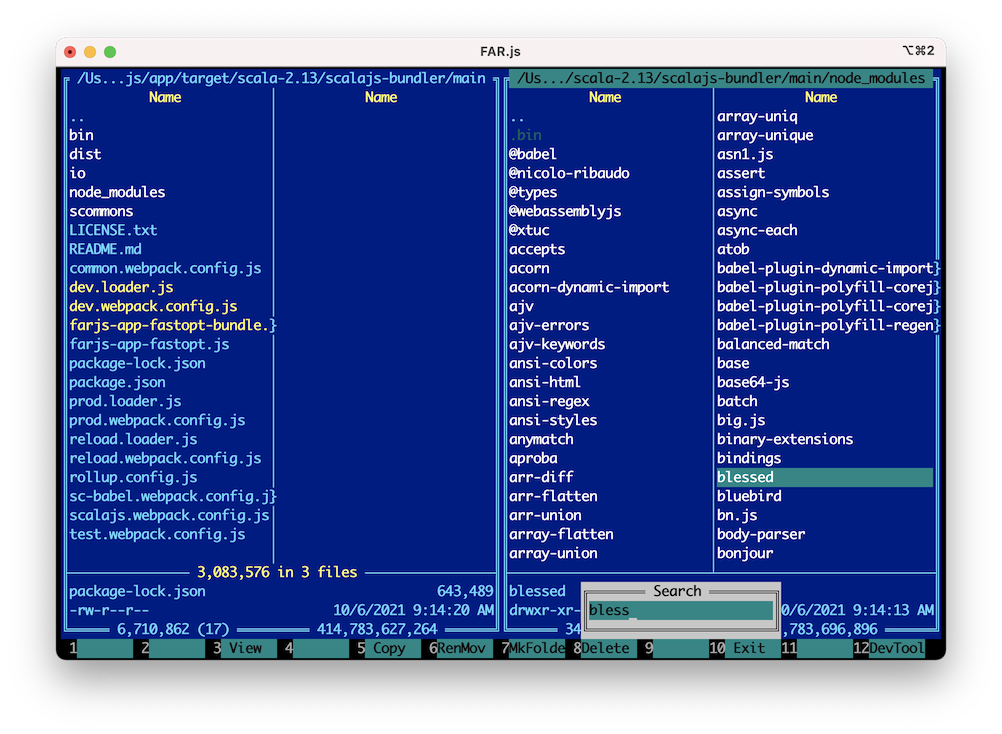
- Developing
- See develop.md
- FAQ
Main application window that consists of two similar panels. Each panel displays list of files and directories. You can perform different operations:
-
Navigation within panels:
- Items selection -
Shift + Up/Down/Left/Right/PageUp/PageDown/Home/End- Select/Deselect group with
Alt + S/Alt + D
- Select/Deselect group with
- Go back to the parent folder -
Ctrl + PageUp - Go into a folder -
Ctrl + PageDown/Return
- Items selection -
-
Drive selection popup (see Key Bindings for how to re-map it to
Alt + F1/F2)- Show it on the left panel -
Alt + L - Show it on the right panel -
Alt + R
- Show it on the left panel -
-
Open item in default application -
Alt + O(see Key Bindings for how to re-map it toShift + Return) -
Copy Path of current item into Clipboard -
Ctrl + C(in iTerm2 only) -
Folder shortcuts -
Ctrl + D -
Folders history -
Alt + H -
File view history -
Alt + V -
Swap the panels -
Ctrl + U -
Quick View of current item on in-active panel -
Ctrl + Q -
Show Quick Search box -
Ctrl + S -
Refresh active panel -
Ctrl + R -
View item(s) -
F3- Opens focused file in the internal File Viewer
- Scans selected folder(s)/file(s) and calculates size(s)
-
Copy item(s) -
F5 -
Copy current item inplace -
Shift + F5 -
Rename/Move item(s) -
F6 -
Rename/Move current item inplace -
Shift + F6 -
Create folder (with intermediate sub-folders) -
F7 -
Add files to archive (ZIP) -
Shift + F7 -
Delete item(s) -
F8 -
Main menu -
F9
Built-in internal text file viewer.
- Wrap/Unwrap text -
F2 - Move view column -
Left/Right - Select Encoding -
F8
Use F12 to show/hide DEV tools components on the right side.
Press F12 again to switch between the components.
Shows all the intercepted console.log and console.error messages,
since the app itself is rendered to the console.
Shows input keys sequences.
Shows possible colors with their hex codes for current terminal/theme.
- Why supported key combination doesn't work or trigger another
action in my terminal?
- Some key combinations (especially
Alt+) have to be manually re-mapped in your terminal settings to send supported escape sequences or hex codes. For example, you can re-map:-
Key Supported Key Escape Sequence ^[ ... Hex Codes Alt + F1Alt + LlAlt + F2Alt + RrAlt + F11Alt + VvAlt + F12Alt + HhShift + ReturnAlt + OoCMD + PageDownCtrl + PageDown[6^CMD + PageUpCtrl + PageUp[5^CMD + RCtrl + R0x12CMD + F3Ctrl + F3[13;5~CMD + F4Ctrl + F4[14;5~CMD + F12Ctrl + F12[24;5~CMD + UpCtrl + Up[1;5ACMD + DownCtrl + Down[1;5B
-
- In iTerm2, when you go to
Preferences -> Keysand press+, it looks like this: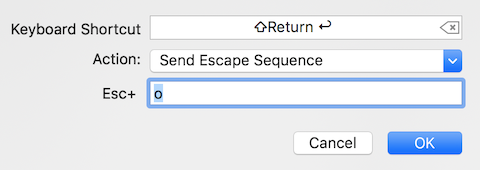
- You can
ImportALL supported keys re-mappings using FAR.js iTerm2 Preset
- In Windows Terminal
you can use sendInput action
(in
settings.json):{ "actions": [ { "command": { "action": "sendInput", "input": "\u001bl" }, "keys": "alt+f1" }, { "command": { "action": "sendInput", "input": "\u001br" }, "keys": "alt+f2" }, { "command": { "action": "sendInput", "input": "\u001bv" }, "keys": "alt+f11" }, { "command": { "action": "sendInput", "input": "\u001bh" }, "keys": "alt+f12" }, { "command": { "action": "sendInput", "input": "\u001bo" }, "keys": "shift+enter" } ] }
- Some key combinations (especially
- Why on my platform I get: Command not found (
unzip/zip) error?- Indeed, on
Windows, for example, they aren't pre-installed. You can download them from here, for example, and then store them in local folder that is listed in thePATHenvironment variable.
- Indeed, on
- How can I open network shared folders on
Mac OS X?- On
Mac OS Xyou can first mount shared folder on local drive by using Connect to Server feature in Finder, see details here. Then you should be able to select it in the Drive selection popup in FAR.js.
- On
- Why on
Windowsplatformmousedoesn't work?- Indeed, on
Windowsmouse may not work, please, check this thread/issue for more details.
- Indeed, on
- Why on
Linux/UbuntuI get???instead of double border characters?- You have to set
LANG=en_US.UTF-8environment variable globally:or via command line:echo "export LANG=en_US.UTF-8" >> ~/.bashrc
LANG=en_US.UTF-8 farjs
- You have to set
- Why in
iTerm2I don't get 256 colors and copy into clipboard support when I runfarjsfrom inside a remote terminal session (ssh,docker exec, etc.)?- Indeed, in case of remote terminal connection
you have to tell
farjsthat it is actually running from inside iTerm2 terminal, for ex. via command line:TERM_PROGRAM=iTerm.app TERM=xterm-256color farjs
- Indeed, in case of remote terminal connection
you have to tell